
IDMarkz (1 Year Subscription) macOS

Author Company: Markzware Inc
IDMarkz (1 Year Subscription) macOS : Markzware app to preview, convert & export Adobe INDD files to IDML, QuarkXPress, PDF & more. ... ...
File Size:
OS:
License: - Time Limit, free to try, to buy.
File Size:
OS:
License: - Time Limit, free to try, to buy.


IDMarkz (1 Year Subscription) macOS
IDMarkz for macOS (InDesign to Affinity, QuarkXPress & More)

InDesign To Affinity Publisher AFPUB Conversion For Creatives
IDMarkz (InDesign to IDML) macOS: Markzware app to preview, convert & export Adobe INDD files to IDML, QuarkXPress, PDF & more. IDMarkz (InDesign to Affinity, QXP & More) macOS - Markzware.
Take control of your creations with IDMarkz® (macOS), Markzware’s next generation of conversion and preview applications. (A Windows version is also available.) You likely have years of work locked away in Adobe InDesign files. This amazing application gives you the ability to preview those files and the power to move them to your preferred editing application. IDMarkz converts InDesign 2026 through CS4 to many file formats!

2017 or newer

v1.8 or newer


CS4 or newer



Often, users have expressed that they need a quick InDesign previewer, not always a full-blown editor. Some have owned InDesign in the past, others receive INDD (or INDT, InDesign Template) files from colleagues from time to time. We are happy to announce a fast and affordable solution!
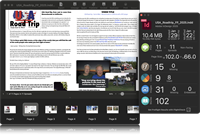
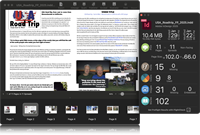
Previews are based on the internal document data. No need to save the document with previews embedded. The displayed preview is representative of the original document. Text is crisp and zoomable.









IDMarkz enables you to export InDesign files to numerous non-proprietary file types, including IDML, PDF, JPEG, PNG, TIFF, GIF, TXT, RTF and HTML. Open .INDD and .INDT (InDesign Template) files in an earlier version of InDesign or in another application! If you need to export to JSON, check out OmniMarkz!

IDMarkz is a cutting-edge solution that revolutionizes content extraction and conversion from unstructured formats. It empowers you to effortlessly extract and convert content from Adobe InDesign (INDD) and other unstructured formats into structured formats like JSON, XML, and IDML, unlocking the true value of your content.
IDMarkz allows you to extract InDesign text stories as RTF, HTML, or plain text (TXT), while preserving the original text formatting, making seamless conversion easier than ever.
Unlock new avenues for revenue growth by recycling your content for a competitive advantage. Leverage vector databases and large language models (LLMs) to streamline your workflow, making it more sustainable and efficient.

Export an InDesign file to high-quality PDF, via IDMarkz, without the Adobe InDesign application. Add annotations, markups, and comments, in Acrobat, and import the editing marks back into InDesign.
Further simplify the process, by configuring the Automation Preferences, to automatically export and open the file in your chosen application. Double click an INDD file in Finder and the document will open in QuarkXPress*, Affinity Publisher, InDesign CS6, or another application of your choice.
With Automation Preferences, AppleScript support and Custom URL Scheme, IDMarkz will have no problem integrating into most automation workflows.
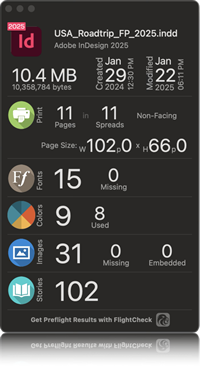
The document inspector gives a high-level document summary, with file type, version, size, creation date, modification date, page count, spread count, page size, font, color, and image data.
With over 30 years of software development experience in Desktop Publishing, Markzware offers a standalone file preview and conversion application, to help you more easily process files in today’s modern Desktop Publishing workflows.
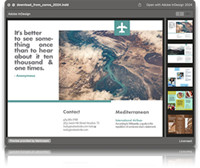
View document previews from any Finder window, with the push of the spacebar. This is a quick and easy method, to find the specific file you are looking for, if you do not remember exactly what you named it.
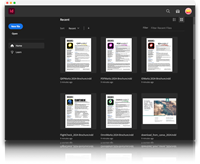
Optionally, turn on thumbnail previews, from the IDMarkz preferences, and view thumbnail previews, in any Finder window. This option will replace the default InDesign file icon with a preview of the first page of the document.
*requires macOS 10.15 or newer
- Standalone Application: IDMarkz does not require Adobe InDesign to be installed to preview or convert files.
- Functionality: It supports opening InDesign files in newer versions, as well as converting them for Affinity Publisher, QuarkXPress, Acrobat, and Illustrator.
- No InDesign Required: Operates independently to convert and preview files.
- Multi-format Conversion: Converts INDD files to IDML, allowing editing in earlier InDesign versions or other DTP apps.
- High-Resolution Previews: Enables viewing of InDesign files with zoom capabilities.
- File Exporting: Exports to PDF (annotatable), TIFF, PNG, JPEG, and GIF.
- Subscription Benefits: Includes 12 months of updates and technical support.
- Operating System:
- RAM : 4GB RAM minimum
- Display : 1024x768 display or better
- Internet Connection : Internet connection to activate and register
- Processor : Supports Intel or Apple Silicon (Universal Binary)
- Model-Specific Support (Minimums) : Mac Pro, iMac, iMac Pro, MacBook, MacBook Pro, MacBook Air, Mac Mini