
IDMarkz (1 Year Subscription) Windows SE

Author Company: Markzware Inc
IDMarkz (1 Year Subscription) Windows SE is Adobe InDesign converter & exporter for Win systems. INDD to IDML, QuarkXPress, Affinity Publisher & more. ... ...
OS:
License: - Time Limit, free to try, to buy.
OS:
License: - Time Limit, free to try, to buy.

* You will be able to download IDMarkz (1 Year Subscription) Windows SE immediately after ordering! *
IDMarkz (1 Year Subscription) Windows SE
IDMarkz SE for Windows (InDesign to Affinity, QuarkXPress & More)

InDesign To Affinity Publisher AFPUB Conversion For Creatives
IDMarkz SE (Windows): Markzware’s Adobe InDesign converter & exporter for Win systems. INDD to IDML, QuarkXPress, Affinity Publisher & more.
Desktop Publishing Documents
IDMarkz SE for Windows is a streamlined edition of IDMarkz, Markzware’s stand-alone InDesign to IDML converter. IDMarkz SE allows you to convert your InDesign files to IDML and open the IDML in programs that support handling IDML files, such as QuarkXPress and Affinity Publisher 1.8 and later.
This makes IDMarkz SE an effective InDesign to QuarkXPress converter or InDesign to Affinity Publisher converter. Additionally, you can set IDMarkz SE to automatically open the converted file in InDesign. Take control of your creations with IDMarkz SE for Windows, our next-generation INDD conversion utility.
Take control of your creations with IDMarkz® (Windows), the first of our next generation of conversion applications. (A macOS version is also available.)
You likely have years of work locked away in InDesign files. This amazing piece of magic gives you the ability to convert those files and the power to move those documents to your preferred editing application. IDMarkz SE users can also visit the cloud-based MarkzPortal, Markzware’s SaaS solution to convert desktop publishing files online.

2017 or newer

V2 or newer

Markzware has long been known for file conversion and preflight technology. Now we take it a step or two further, with our standalone File Inventory, and Conversion application, IDMarkz SE!
IDMarkz SE enables you to export InDesign files as IDML. Open .INDD and .INDT (InDesign Template) files in an earlier version of InDesign, Affinity Publisher, QuarkXPress, or in another application!
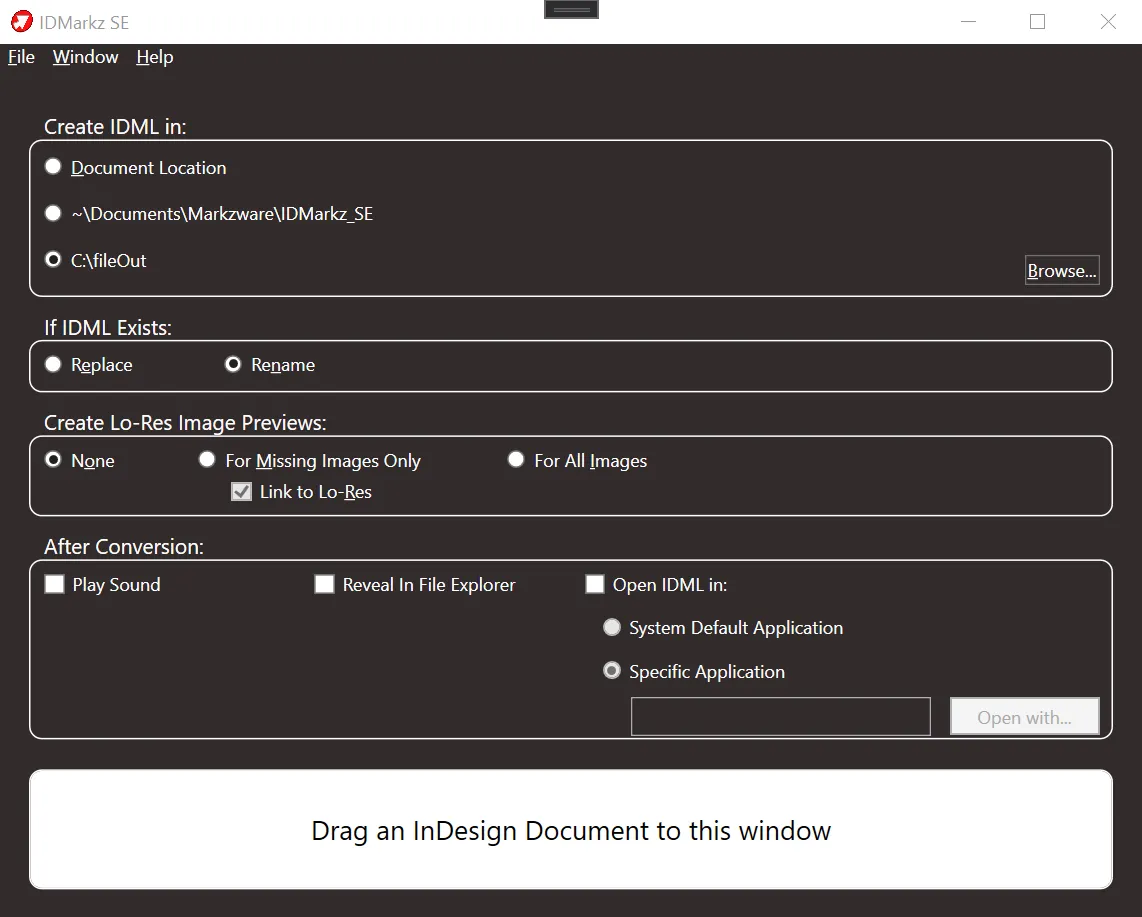
Simplify the process, by configuring the After Conversion Preferences, to automatically open the exported IDML in your chosen application. Double click an INDD file in Windows Explorer and the document will open in QuarkXPress*, Affinity Publisher, InDesign CS6, or another application of your choice.
- Saves time and money, while preserving intellectual property and providing a single, reliable solution for Adobe InDesign file conversion
- Provides a simple interface to drag & drop InDesign files and convert them to IDML via Control-O (Open File dialog), then select the file to convert
- Eliminates the need to manually rebuild entire INDD documents from scratch
- Stand-alone application; no applications or plug-ins are required
- Open Adobe InDesign files in other formats; navigate to and select the INDD file you would like to convert; use the shortcut key combo of Control-O
- The Open Recent menu item contains a list of the most recently converted files
- Show Status Window brings up a Status window where you can see information about files you converted or that did not convert
- The Help Menu contains the following items –
User Guide: This is a link to the online User Guide for IDMarkz SE
Online Tutorials: This is a link to online tutorials
Report an Issue: Clicking Report an Issue will bring up Markzware’s online Trouble Ticket form where you can report issues
About: This window displays the Activation Status of IDMarkz SE and the option to Deactivate IDMarkz SE
- Operating System:
- RAM : 4 GB Minimum
- Display : 1024 x 768 display or better
- Internet : Required for activation and registration
- Requirements to open converted files : QuarkXPress 2017 or newer, or Affinity Publisher 1.8 or newer
