
TeraByte Drive Image Backup and Restore Suite 4

Author Company: TeraByte, Inc.
TeraByte Drive Image Backup and Restore Suite 4 | There's no better way to ensure all of your data is safely backed up than by creating a byte-by-byte image of the used areas on your hard drive. ... ...
File Size:
OS:
License: - Time Limit, free to try, to buy.
File Size:
OS:
License: - Time Limit, free to try, to buy.


TeraByte Drive Image Backup and Restore Suite 4
Image for Windows - TeraByte Unlimited
There's no better way to ensure all of your data is safely backed up than by creating a byte-by-byte image of the used areas on your hard drive. TeraByte Drive Image Backup and Restore Suite is a comprehensive backup and restore solution which does precisely that.
Defrag Windows and optimize your hard drive safely with Smart Defrag. Improve PC speed and performance on Windows 11/10/8/7. Download the free disk defragmenter now!
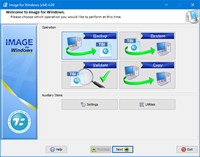
Image for Windows provides an easy and convenient way to completely backup all your hard drive’s data, programs and operating systems. Your backups can be saved directly to external USB and FireWire™ drives, to internal or network drives, and even directly to CD, DVD, or BD. The suite includes an easy-to-use MakeDisk wizard for creating a recovery boot disk. To restore your data, programs and operating systems back to the way they were when the backup was created, simply boot the recovery disk and restore the partition(s) or drive(s) you need to recover. It’s that easy.
As a key component of the TeraByte Drive Image Backup and Restore Suite, Image for Windows utilizes the technology provided by Volume Shadow Copy Service (VSS) or PHYLock™, an add-on component included in the suite. VSS and PHYLock™ allows you to continue using your computer while the backup is locked to a point-in-time. This eliminates the inconsistencies typically experienced while backing up a partition that is in use.
Image for Windows runs under the Windows operating system, yet it can backup or restore any partition, including those of DOS or Linux, and even partitions encrypted by third-party software.
The TeraByte drive image files produced by Image for Windows are compatible across all TeraByte Unlimited disk imaging products of the same major version number (i.e. all 3.x products are compatible with other 3.x products). This gives you the flexibility to restore disk images using your component of choice.
The TeraByte Drive Image Backup and Restore Suite includes Image for Windows, Image for Linux, Image for DOS, and the OSD Tool Suite. Image for DOS and Image for Linux support the same powerful drive image functionality without requiring a working Windows installation.
Bonus: The TeraByte OS Deployment Tool Suite (TBOSDTS) Pro version contains a set of powerful scripts that, among other things, will help you deploy Windows to completely different hardware.
- Compatible with Windows x86, x64 and ARM64 versions.
- Compatible with Windows 7 SP1, 8, 8.1, 10, 11, …
- Compatible with Windows Server 2008 R2 SP1, 2011, 2012/R2, 2016, 2019, …
- Legacy Version 3.56 is Compatible with Windows NT4, 2000, XP, Vista, 7, …
- Legacy Version 3.56 is Compatible with Windows Server NT4, 2000, 2003, 2008/R2, …
- Total Reliability – Provides the option to verify each and every byte it backs up.
- Convenience – Runs directly from Windows and when used with the free PHYLock™ add-on or VSS (built-in to modern Windows versions), it can create a true image of the Windows partition itself, without requiring a reboot.
- Security – Your backups can be secured using simple password protection, or full 256-bit AES encryption.
- Backup Changed Data – Change only backup option allows you to backup only data that has changed since the last backup was created.
- Simple, Wizard-Driven interface – Easy to use the first time, and every time.
- Maximum Speed – Fast, yet reliable techniques are used to create the backups quickly. – Speed or size, several reliable compression options are available.
- Optical Drive Support – You can save directly to a CD, DVD, DVD-DL, BD.
- Bootable Rescue Discs – Whenever you save directly to a CD, DVD, DVD-DL, BD, it will automatically become a bootable restore disc.
- Large drive support – GPT compatible supporting drives larger than 2TiB.
- Restore Individual Files or Folders – Using the free TBIView and TBIMount add-ons, you can view the contents of the drive image files, and optionally restore individual files or folders within them.
- Compatibility – Automatically recognizes and backs up used area of FAT16, FAT32, NTFS, HFS+, Ext2, Ext3, Ext4, BTRFS, ReiserFS, and XFS partitions. It also recognizes and backs up used areas of ReFS and exFAT partitions using Windows support. Partitions with other file system types can be backed up in their entirety. Supports all standard partitions in an MBR, EMBR, or GPT.
- Windows Servers – Supports both Workstation and Server versions of Windows.
- Restore Workstation Trust – Optionally restore a Windows Workstation trust with its domain.
- Network Management – Centrally install, schedule and monitor use on Windows systems across the network.
- Multicasting – Supports multicasting to reduce network traffic when deploying multiple Workstations.
- Cost Effectiveness – Includes Image for DOS, Image for Linux, and TBOSDT at no additional charge, making it a uniquely affordable and complete disk imaging solution.
- Flexibility – Restore partitions, regardless of the file system on the partition being restored. This gives you the power to restore NTFS partitions from Windows 98 or even DOS (as just a couple of examples).
- Wide-Ranging Device Support – Compatible with NVMe, SAS, SCSI, PATA, SATA, USB, IEEE 1394, and more.
- Power – Using Image for DOS, Image for UEFI, Image for Linux, or Image for Windows recovery media (each of which is included with the purchase of the Drive Image Suite) gives you the ability to recover your data, even if Windows won’t start.
- Network Support – Save backups to any drive or UNC accessible to Windows itself, including cloud connected shares.
- RAID Support – Works seamlessly with on-board hardware- and firmware-based RAID.
- Command Line Support – Powerful, complete command line support is built in, allowing you to automate backup or restore procedures.
- Scheduling – Leverages the built-in Windows scheduler via the simple click of a Schedule Backup button.
- Image File Validation – Allows you to thoroughly check the integrity of the disk image files, either as part of the backup process, or at any time thereafter. TeraByte imaging products are renown for their thorough and accurate validation process.
- Restored Partition Expansion – When restoring an image, you can expand the restored partition to occupy any free space that would be left over.
- Selectable Image File Sizes – If desired, you can specify a maximum size for the disk image files that are created. This allows you to create image files that readily fit on the removable media of your choice.
- Hardware Independent Restore – Restore Windows to completely different hardware and then use the TeraByte OSD Tool Suite to install the drivers required to support the new hardware.
- Physical to Virtual – Scripts included to automatically convert your physical machine to a virtual machine, either directly or from a backup image.
- Virtual to Physical – Convert your virtual machine to a physical machine using the included scripts.
In this digital age, our data is expansive and it represents every aspect of our lives. Pictures, documents, movies, and much more. Even though many of us utilize cloud storage, it’s still a good idea to keep your precious data backed up closer to home.
If there’s an unexpected data loss you could be out more than just a few gigabytes of pictures or videos. That’s where TeraByte Drive Image Backup For Windows comes in to save the day if and when you need it.
The advanced backup features of Drive Image Backup keeps your valuable data safe and secure. You can save backups to a wide range of media including DVD, CD, external hard drives, network drives, and more. Your stored data can be easily retrieved and restored whenever you need it.

If you ever need help with Drive Image Backup we're available 24x7 via our help desk.

Drive Image Backup for Windows is super easy to install and use. Even by novice users.

Drive Image Backup for Windows is powered by Volume Shadow Copy Service (VSS) or PHYLock™ so you can keep working while backing up.

Drive Image Backup for Windows runs on all versions of Windows OS, yet it can backup or restore any partition including Linux and DOS!

You can try Drive Image Backup with zero risk. Try it and test it out BEFORE you buy it. Satisfaction guaranteed!

Internal consistencies and Byte-for-byte validation ensures the integrity of your backups.

Backup and restore Bitlocker data.

Automatically recognizes and backs up used area of FAT16, FAT32, NTFS, HFS+, Ext2, Ext3, Ext4, ReiserFS, and XFS partitions.

Supports multicasting to reduce network traffic when deploying multiple Workstations.

TBScript™, Powerful scripting language, including scripts for Hardware independent restore and conversion from physical to virtual machines.

Your backups can be secured using simple password protection, or full 256 bit AES encryption; and they can even be protected from Ransomware by utilizing the included ProtectIt™ component.

A single license for personal can be used on 5 devices in your household.
- Operating System : .
Note: Minimum system requirements mandate SHA-2 support. - Processor : Standard x86 or x64 processor.
- RAM Memory : Minimum 512 MB [System Memory] is recommended to run the base software and create backups.
- Storage : Only requires a few megabytes for installation on your primary drive, though you will need external or secondary storage for the actual backup images.