 Utilities
System Utilities
Realtime-Spy MAC Description
Realtime-Spy MAC

Author Company: Spytech Software and Design, Inc.
Realtime-Spy MAC is remotely deployable (no physical installation needed), and its activity logs are accessible from anywhere - regardless if the remote computer is online or not. ... ...
OS:
License: - Time Limit, free to try, to buy.
OS:
License: - Time Limit, free to try, to buy.

* You will be able to download Realtime-Spy immediately after ordering! *
Spytech Realtime-Spy MAC
Monitor your Mac from Anywhere

Cloud-based Remote Spy Software for your Mac - Monitor Today!.
Realtime-Spy is the latest in cutting-edge computer monitoring technology that allows you to monitor YOUR PC, MAC, CHROMEBOOK, or ANDROID from ANYWHERE.
Realtime-Spy for PC and MAC is remotely deployable (no physical installation needed), and its activity logs are accessible from anywhere - regardless if the remote computer is online or not.
Once installed, Realtime-Spy monitors the remote PC, MAC, CHROMEBOOK, or ANDROID device in total stealth, and cloaks itself to avoid being detected. Monitors keystrokes, website visits, windows viewed, and more!
The #1 remote Mac spy software, Spytech Realtime-Spy is a cloud-based, high-tech Mac OS X and macOS computer monitoring software solution that logs everything your child or employee does on your Mac. Realtime-Spy allows you to remotely install the monitoring system on any Mac computer you own and view the activity logs in real-time from anywhere, 24/7, via our secure Realtime-Spy website!

Log and See Activities As They Occur

Install Remotely & View from Anywhere

Log What Users Type on your Mac

View Screenshots of User Activity

Log Website Visits & Online Searches

See What Apps are Used, and How Long

Track How Active & Idle Users Are

Track Messaging, Emails, and More

Logging Access Anytime, Anywhere
24/7 access to your monitored Mac, from any location via your personal, secure website address given to you after you purchase! Your activity logs are password protected and updated in real-time for constant review.Real-time Activity, Keystroke, and Screenshot Viewing
As Realtime-Spy's name implies, it can show you what users do in real-time at the exact instant they perform an action - from apps being opened and closed, to computer usage and website visits. Realtime-Spy can also display what users are typing in real-time, as they type, and display screenshots every few seconds for accurate remote visual monitoring.Centralized, Multiple User/Mac Logging
Log and record MULTIPLE MAC computers from ONE REMOTE LOCATION without any extra configuration - just click what computers you want to view logs for. Logs are automatically stored and categorized by username and computer name for easy log management, and can be viewed individually by computer, or all at one time.Convenient Visual Activity Overviews
Realtime-Spy can display a visual overview that shows you the current screen of all of your computers that you are monitoring at once, and can also display graphical activity overviews for individual computers, or all computers, showing trends in most used applications and websites, which users are most active and idle, and much more.Graphical Top 10 Reports
Realtime-Spy's web interface can display useful Top 10 activity reports for computer usage (most idle and active users), file usage, window usage, website usage, application usage, and more! Reports can be generated for individual computers, or for all computers logged in your account.Real-time Activity Alerts
Realtime-Spy can be configured to alert you when specific keywords are typed or used by the user, allowing you to quickly react when unwanted behaviors occur.Easy Log Management and Archiving
Realtime-Spy's member's area allows you to clear individual logs, all logs, or entire computers from your account in seconds. Logs can be quickly archived and downloaded for storage or future use. Logs can be searched for specific information.

Keystrokes Typed
Realtime-Spy's keystroke logger allows you to record what keystrokes users type while using your Mac. All keystroke logs include the title of the window and name of the application that the keystrokes were typed in, along with the username of the use that typed them, and when. *Due to security restrictions in Mac OS passwords typed are not logged*Events Timeline
Log all events users performed and view them in an organized chronologically ordered listing. The Events Timeline lets you view what events the user performed, in the order they did them. Events logged include Application Starts/Stops, Website Visits, Computer Usage, Window Interactions, and more.Screenshot Captures
See exactly what users are doing on your computer with full color visual screenshot captures. Realtime-Spy's screenshot captures show who users are talking to, emailing, interaction with on social networks, and much more.Website Usage
Log all website visits performed by users on your computer. All website visits are logged by website address, username, and time of the site visit. Realtime-Spy also logs how long users visit each website so you can easily see what websites are visited the longest. Chrome and Safari web-browsers supported. Incognito and InPrivate browser usage is also logged.Application Usage
Monitor and log all applications ran by users. Realtime-Spy logs when each application was started, stopped, and how long it was actually used, giving you an exact picture of how users are spending their time on your Mac.Window Interactions
Realtime-Spy will log any application window that users interact with. Window interactions log entries include the title of the window interacted with, the application the window belongs to, and when the user interacted with the window.Computer Usage
Realtime-Spy's computer usage monitoring logs how long users are active, and inactive during each computer session. Logs show when each session started, and when it ended.File Usage
Realtime-Spy will log all files created, renamed, and deleted by the remote user.Location Changes
Log and track the approximate location of your computer so you always know where your computer is located.Clipboard Activity
Log all text copied to the Mac clipboard, along with the title of the window in use that the text was copied from.

Remote Installation, Configuration, and Removal
Realtime-Spy can be remotely installed without physical presence needed for installation. Realtime-Spy can later be uninstalled and permanently disallowed from running on a remote computer, again without physical interaction with the remote computer. The install happens instantly and starts monitoring immediately. Please note that Realtime-Spy does tell the user that monitoring software is being installed, and they have the option to cancel the install, but once installed the software runs invisibly.Easy Remote Deployment
Realtime-Spy can be remotely deployed easily with just a few clicks and minimal user interaction.- Email Deployment: simply send your configured Realtime-Spy module to the remote Mac. The user only has to run the attached app file - they do not have to respond or send you any response to start monitoring your Mac.
- LAN/Network Deployment: Easily deploy Realtime-Spy over a network via network shares or logon scripts.
- Physical Deployment: quickly install Realtime-Spy by running the created logging app on your Mac.
Extremely Small File Size
Realtime-Spy's logging app is less than 250kb in size, allowing it to be quickly and easily sent via email, transferred over networks, and stored onto portable storage media without any difficulties.Remote Administration
Realtime-Spy allows you to remotely shutdown, restart, and logoff the remote Mac via your administration area.

Invisible to the User
Once installed, Realtime-Spy is designed to be an invisible and secure monitoring system. Using minimal CPU processing cycles, Realtime-Spy is not visible in any way to the user, and records and updates all logs without any user notification. Realtime-Spy does not appear in the Mac OS Force Quit manager, or reveal itself to the user on your desktop or Finder applications folder.Cloaked Installation
Realtime-Spy runs in COMPLETE STEALTH and cloaks itself to hide from the remote user! The installation app that is ran on your Mac will install a copy of itself that is hidden so it cannot be disrupted/removed. The created app file you use to install the Realtime-Spy logging process on your Mac is able to be discarded and deleted - without affecting Realtime-Spy's monitoring process!
Realtime-Spy can only be installed onto a computer you own, and have authorization to monitor. It cannot be used to monitor computers you do not own and administrator access is required. Users are informed they are installing monitoring software during the installation.
- Operating System:
- Storage : 1MB Hard disk space
- Administrative Privileges : Administrator access is required for proper installation
- Web-browser and Internet Connection for Log Transmission and Viewing

All logs are viewable from anywhere via your secure Realtime-Spy account

Capture and replay screen captures of what the user did. See exactly what they were doing. View the user's screen in real-time.

Log keystrokes typed on your Mac and view content, window title, and the application they were typed in.

Log all activities in a chronological events log for quick viewing of activities as they happen.

See what apps users ran and interacted with, when they ran them, and how long they actually used/interacted with them.

Capture websites visited, online searches, dark web, and download activity with time and duration logging. Tracks Private browsing.

Record and track how long users are active on your Mac, and how long they are idle or inactive.

View activity and see who users are talking to across social networks and chat messengers.

Log all emails typed and view copies of email activity via screen captures so that no communication is untracked.

Log and record where, and when, your Mac has been used, with map-based viewing.
Logging Access Anytime, Anywhere
24/7 access to your monitored Mac, from any location via your personal, secure website address given to you after you purchase! Your activity logs are password protected and updated in real-time for constant review.Real-time Activity, Keystroke, and Screenshot Viewing
As Realtime-Spy's name implies, it can show you what users do in real-time at the exact instant they perform an action - from apps being opened and closed, to computer usage and website visits. Realtime-Spy can also display what users are typing in real-time, as they type, and display screenshots every few seconds for accurate remote visual monitoring.Centralized, Multiple User/Mac Logging
Log and record MULTIPLE MAC computers from ONE REMOTE LOCATION without any extra configuration - just click what computers you want to view logs for. Logs are automatically stored and categorized by username and computer name for easy log management, and can be viewed individually by computer, or all at one time.Convenient Visual Activity Overviews
Realtime-Spy can display a visual overview that shows you the current screen of all of your computers that you are monitoring at once, and can also display graphical activity overviews for individual computers, or all computers, showing trends in most used applications and websites, which users are most active and idle, and much more.Graphical Top 10 Reports
Realtime-Spy's web interface can display useful Top 10 activity reports for computer usage (most idle and active users), file usage, window usage, website usage, application usage, and more! Reports can be generated for individual computers, or for all computers logged in your account.Real-time Activity Alerts
Realtime-Spy can be configured to alert you when specific keywords are typed or used by the user, allowing you to quickly react when unwanted behaviors occur.Easy Log Management and Archiving
Realtime-Spy's member's area allows you to clear individual logs, all logs, or entire computers from your account in seconds. Logs can be quickly archived and downloaded for storage or future use. Logs can be searched for specific information.
Keystrokes Typed
Realtime-Spy's keystroke logger allows you to record what keystrokes users type while using your Mac. All keystroke logs include the title of the window and name of the application that the keystrokes were typed in, along with the username of the use that typed them, and when. *Due to security restrictions in Mac OS passwords typed are not logged*Events Timeline
Log all events users performed and view them in an organized chronologically ordered listing. The Events Timeline lets you view what events the user performed, in the order they did them. Events logged include Application Starts/Stops, Website Visits, Computer Usage, Window Interactions, and more.Screenshot Captures
See exactly what users are doing on your computer with full color visual screenshot captures. Realtime-Spy's screenshot captures show who users are talking to, emailing, interaction with on social networks, and much more.Website Usage
Log all website visits performed by users on your computer. All website visits are logged by website address, username, and time of the site visit. Realtime-Spy also logs how long users visit each website so you can easily see what websites are visited the longest. Chrome and Safari web-browsers supported. Incognito and InPrivate browser usage is also logged.Application Usage
Monitor and log all applications ran by users. Realtime-Spy logs when each application was started, stopped, and how long it was actually used, giving you an exact picture of how users are spending their time on your Mac.Window Interactions
Realtime-Spy will log any application window that users interact with. Window interactions log entries include the title of the window interacted with, the application the window belongs to, and when the user interacted with the window.Computer Usage
Realtime-Spy's computer usage monitoring logs how long users are active, and inactive during each computer session. Logs show when each session started, and when it ended.File Usage
Realtime-Spy will log all files created, renamed, and deleted by the remote user.Location Changes
Log and track the approximate location of your computer so you always know where your computer is located.Clipboard Activity
Log all text copied to the Mac clipboard, along with the title of the window in use that the text was copied from.
Remote Installation, Configuration, and Removal
Realtime-Spy can be remotely installed without physical presence needed for installation. Realtime-Spy can later be uninstalled and permanently disallowed from running on a remote computer, again without physical interaction with the remote computer. The install happens instantly and starts monitoring immediately. Please note that Realtime-Spy does tell the user that monitoring software is being installed, and they have the option to cancel the install, but once installed the software runs invisibly.Easy Remote Deployment
Realtime-Spy can be remotely deployed easily with just a few clicks and minimal user interaction.- Email Deployment: simply send your configured Realtime-Spy module to the remote Mac. The user only has to run the attached app file - they do not have to respond or send you any response to start monitoring your Mac.
- LAN/Network Deployment: Easily deploy Realtime-Spy over a network via network shares or logon scripts.
- Physical Deployment: quickly install Realtime-Spy by running the created logging app on your Mac.
Extremely Small File Size
Realtime-Spy's logging app is less than 250kb in size, allowing it to be quickly and easily sent via email, transferred over networks, and stored onto portable storage media without any difficulties.Remote Administration
Realtime-Spy allows you to remotely shutdown, restart, and logoff the remote Mac via your administration area.
Invisible to the User
Once installed, Realtime-Spy is designed to be an invisible and secure monitoring system. Using minimal CPU processing cycles, Realtime-Spy is not visible in any way to the user, and records and updates all logs without any user notification. Realtime-Spy does not appear in the Mac OS Force Quit manager, or reveal itself to the user on your desktop or Finder applications folder.Cloaked Installation
Realtime-Spy runs in COMPLETE STEALTH and cloaks itself to hide from the remote user! The installation app that is ran on your Mac will install a copy of itself that is hidden so it cannot be disrupted/removed. The created app file you use to install the Realtime-Spy logging process on your Mac is able to be discarded and deleted - without affecting Realtime-Spy's monitoring process!
Realtime-Spy can only be installed onto a computer you own, and have authorization to monitor. It cannot be used to monitor computers you do not own and administrator access is required. Users are informed they are installing monitoring software during the installation.
- Operating System:
- Storage : 1MB Hard disk space
- Administrative Privileges : Administrator access is required for proper installation
- Web-browser and Internet Connection for Log Transmission and Viewing

View what the user of your Mac is typing as they are typing.

View your Mac's screen from anywhere; see what the user does as they do it.

View the user's activities in real-time, as they occur. No delays between log updates.
Logging Access Anytime, Anywhere
24/7 access to your monitored Mac, from any location via your personal, secure website address given to you after you purchase! Your activity logs are password protected and updated in real-time for constant review.Real-time Activity, Keystroke, and Screenshot Viewing
As Realtime-Spy's name implies, it can show you what users do in real-time at the exact instant they perform an action - from apps being opened and closed, to computer usage and website visits. Realtime-Spy can also display what users are typing in real-time, as they type, and display screenshots every few seconds for accurate remote visual monitoring.Centralized, Multiple User/Mac Logging
Log and record MULTIPLE MAC computers from ONE REMOTE LOCATION without any extra configuration - just click what computers you want to view logs for. Logs are automatically stored and categorized by username and computer name for easy log management, and can be viewed individually by computer, or all at one time.Convenient Visual Activity Overviews
Realtime-Spy can display a visual overview that shows you the current screen of all of your computers that you are monitoring at once, and can also display graphical activity overviews for individual computers, or all computers, showing trends in most used applications and websites, which users are most active and idle, and much more.Graphical Top 10 Reports
Realtime-Spy's web interface can display useful Top 10 activity reports for computer usage (most idle and active users), file usage, window usage, website usage, application usage, and more! Reports can be generated for individual computers, or for all computers logged in your account.Real-time Activity Alerts
Realtime-Spy can be configured to alert you when specific keywords are typed or used by the user, allowing you to quickly react when unwanted behaviors occur.Easy Log Management and Archiving
Realtime-Spy's member's area allows you to clear individual logs, all logs, or entire computers from your account in seconds. Logs can be quickly archived and downloaded for storage or future use. Logs can be searched for specific information.
Keystrokes Typed
Realtime-Spy's keystroke logger allows you to record what keystrokes users type while using your Mac. All keystroke logs include the title of the window and name of the application that the keystrokes were typed in, along with the username of the use that typed them, and when. *Due to security restrictions in Mac OS passwords typed are not logged*Events Timeline
Log all events users performed and view them in an organized chronologically ordered listing. The Events Timeline lets you view what events the user performed, in the order they did them. Events logged include Application Starts/Stops, Website Visits, Computer Usage, Window Interactions, and more.Screenshot Captures
See exactly what users are doing on your computer with full color visual screenshot captures. Realtime-Spy's screenshot captures show who users are talking to, emailing, interaction with on social networks, and much more.Website Usage
Log all website visits performed by users on your computer. All website visits are logged by website address, username, and time of the site visit. Realtime-Spy also logs how long users visit each website so you can easily see what websites are visited the longest. Chrome and Safari web-browsers supported. Incognito and InPrivate browser usage is also logged.Application Usage
Monitor and log all applications ran by users. Realtime-Spy logs when each application was started, stopped, and how long it was actually used, giving you an exact picture of how users are spending their time on your Mac.Window Interactions
Realtime-Spy will log any application window that users interact with. Window interactions log entries include the title of the window interacted with, the application the window belongs to, and when the user interacted with the window.Computer Usage
Realtime-Spy's computer usage monitoring logs how long users are active, and inactive during each computer session. Logs show when each session started, and when it ended.File Usage
Realtime-Spy will log all files created, renamed, and deleted by the remote user.Location Changes
Log and track the approximate location of your computer so you always know where your computer is located.Clipboard Activity
Log all text copied to the Mac clipboard, along with the title of the window in use that the text was copied from.
Remote Installation, Configuration, and Removal
Realtime-Spy can be remotely installed without physical presence needed for installation. Realtime-Spy can later be uninstalled and permanently disallowed from running on a remote computer, again without physical interaction with the remote computer. The install happens instantly and starts monitoring immediately. Please note that Realtime-Spy does tell the user that monitoring software is being installed, and they have the option to cancel the install, but once installed the software runs invisibly.Easy Remote Deployment
Realtime-Spy can be remotely deployed easily with just a few clicks and minimal user interaction.- Email Deployment: simply send your configured Realtime-Spy module to the remote Mac. The user only has to run the attached app file - they do not have to respond or send you any response to start monitoring your Mac.
- LAN/Network Deployment: Easily deploy Realtime-Spy over a network via network shares or logon scripts.
- Physical Deployment: quickly install Realtime-Spy by running the created logging app on your Mac.
Extremely Small File Size
Realtime-Spy's logging app is less than 250kb in size, allowing it to be quickly and easily sent via email, transferred over networks, and stored onto portable storage media without any difficulties.Remote Administration
Realtime-Spy allows you to remotely shutdown, restart, and logoff the remote Mac via your administration area.
Invisible to the User
Once installed, Realtime-Spy is designed to be an invisible and secure monitoring system. Using minimal CPU processing cycles, Realtime-Spy is not visible in any way to the user, and records and updates all logs without any user notification. Realtime-Spy does not appear in the Mac OS Force Quit manager, or reveal itself to the user on your desktop or Finder applications folder.Cloaked Installation
Realtime-Spy runs in COMPLETE STEALTH and cloaks itself to hide from the remote user! The installation app that is ran on your Mac will install a copy of itself that is hidden so it cannot be disrupted/removed. The created app file you use to install the Realtime-Spy logging process on your Mac is able to be discarded and deleted - without affecting Realtime-Spy's monitoring process!
Realtime-Spy can only be installed onto a computer you own, and have authorization to monitor. It cannot be used to monitor computers you do not own and administrator access is required. Users are informed they are installing monitoring software during the installation.
- Operating System:
- Storage : 1MB Hard disk space
- Administrative Privileges : Administrator access is required for proper installation
- Web-browser and Internet Connection for Log Transmission and Viewing

Quickly view a graph and report showing the selected computer's (or all computers') activities for the current day, and overall. Top applications and websites, as well as total app and web usage time, and active usage and idle times are displayed.
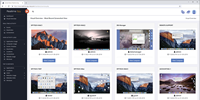
View a tiled gallery displaying the desktop of each Mac that you are monitoring with the most recent screenshots shown: easily observe what is happening on each of your Macs in one viewer.
Logging Access Anytime, Anywhere
24/7 access to your monitored Mac, from any location via your personal, secure website address given to you after you purchase! Your activity logs are password protected and updated in real-time for constant review.Real-time Activity, Keystroke, and Screenshot Viewing
As Realtime-Spy's name implies, it can show you what users do in real-time at the exact instant they perform an action - from apps being opened and closed, to computer usage and website visits. Realtime-Spy can also display what users are typing in real-time, as they type, and display screenshots every few seconds for accurate remote visual monitoring.Centralized, Multiple User/Mac Logging
Log and record MULTIPLE MAC computers from ONE REMOTE LOCATION without any extra configuration - just click what computers you want to view logs for. Logs are automatically stored and categorized by username and computer name for easy log management, and can be viewed individually by computer, or all at one time.Convenient Visual Activity Overviews
Realtime-Spy can display a visual overview that shows you the current screen of all of your computers that you are monitoring at once, and can also display graphical activity overviews for individual computers, or all computers, showing trends in most used applications and websites, which users are most active and idle, and much more.Graphical Top 10 Reports
Realtime-Spy's web interface can display useful Top 10 activity reports for computer usage (most idle and active users), file usage, window usage, website usage, application usage, and more! Reports can be generated for individual computers, or for all computers logged in your account.Real-time Activity Alerts
Realtime-Spy can be configured to alert you when specific keywords are typed or used by the user, allowing you to quickly react when unwanted behaviors occur.Easy Log Management and Archiving
Realtime-Spy's member's area allows you to clear individual logs, all logs, or entire computers from your account in seconds. Logs can be quickly archived and downloaded for storage or future use. Logs can be searched for specific information.
Keystrokes Typed
Realtime-Spy's keystroke logger allows you to record what keystrokes users type while using your Mac. All keystroke logs include the title of the window and name of the application that the keystrokes were typed in, along with the username of the use that typed them, and when. *Due to security restrictions in Mac OS passwords typed are not logged*Events Timeline
Log all events users performed and view them in an organized chronologically ordered listing. The Events Timeline lets you view what events the user performed, in the order they did them. Events logged include Application Starts/Stops, Website Visits, Computer Usage, Window Interactions, and more.Screenshot Captures
See exactly what users are doing on your computer with full color visual screenshot captures. Realtime-Spy's screenshot captures show who users are talking to, emailing, interaction with on social networks, and much more.Website Usage
Log all website visits performed by users on your computer. All website visits are logged by website address, username, and time of the site visit. Realtime-Spy also logs how long users visit each website so you can easily see what websites are visited the longest. Chrome and Safari web-browsers supported. Incognito and InPrivate browser usage is also logged.Application Usage
Monitor and log all applications ran by users. Realtime-Spy logs when each application was started, stopped, and how long it was actually used, giving you an exact picture of how users are spending their time on your Mac.Window Interactions
Realtime-Spy will log any application window that users interact with. Window interactions log entries include the title of the window interacted with, the application the window belongs to, and when the user interacted with the window.Computer Usage
Realtime-Spy's computer usage monitoring logs how long users are active, and inactive during each computer session. Logs show when each session started, and when it ended.File Usage
Realtime-Spy will log all files created, renamed, and deleted by the remote user.Location Changes
Log and track the approximate location of your computer so you always know where your computer is located.Clipboard Activity
Log all text copied to the Mac clipboard, along with the title of the window in use that the text was copied from.
Remote Installation, Configuration, and Removal
Realtime-Spy can be remotely installed without physical presence needed for installation. Realtime-Spy can later be uninstalled and permanently disallowed from running on a remote computer, again without physical interaction with the remote computer. The install happens instantly and starts monitoring immediately. Please note that Realtime-Spy does tell the user that monitoring software is being installed, and they have the option to cancel the install, but once installed the software runs invisibly.Easy Remote Deployment
Realtime-Spy can be remotely deployed easily with just a few clicks and minimal user interaction.- Email Deployment: simply send your configured Realtime-Spy module to the remote Mac. The user only has to run the attached app file - they do not have to respond or send you any response to start monitoring your Mac.
- LAN/Network Deployment: Easily deploy Realtime-Spy over a network via network shares or logon scripts.
- Physical Deployment: quickly install Realtime-Spy by running the created logging app on your Mac.
Extremely Small File Size
Realtime-Spy's logging app is less than 250kb in size, allowing it to be quickly and easily sent via email, transferred over networks, and stored onto portable storage media without any difficulties.Remote Administration
Realtime-Spy allows you to remotely shutdown, restart, and logoff the remote Mac via your administration area.
Invisible to the User
Once installed, Realtime-Spy is designed to be an invisible and secure monitoring system. Using minimal CPU processing cycles, Realtime-Spy is not visible in any way to the user, and records and updates all logs without any user notification. Realtime-Spy does not appear in the Mac OS Force Quit manager, or reveal itself to the user on your desktop or Finder applications folder.Cloaked Installation
Realtime-Spy runs in COMPLETE STEALTH and cloaks itself to hide from the remote user! The installation app that is ran on your Mac will install a copy of itself that is hidden so it cannot be disrupted/removed. The created app file you use to install the Realtime-Spy logging process on your Mac is able to be discarded and deleted - without affecting Realtime-Spy's monitoring process!
Realtime-Spy can only be installed onto a computer you own, and have authorization to monitor. It cannot be used to monitor computers you do not own and administrator access is required. Users are informed they are installing monitoring software during the installation.
- Operating System:
- Storage : 1MB Hard disk space
- Administrative Privileges : Administrator access is required for proper installation
- Web-browser and Internet Connection for Log Transmission and Viewing
View the most used applications by session, and overall usage.
View the most used and visited websites and web pages.
View the most active and idle users of your Mac.

View the most popular online searches performed.
View the top locations where your Mac was used.

View the top windows used, by number of uses and application.
Logging Access Anytime, Anywhere
24/7 access to your monitored Mac, from any location via your personal, secure website address given to you after you purchase! Your activity logs are password protected and updated in real-time for constant review.Real-time Activity, Keystroke, and Screenshot Viewing
As Realtime-Spy's name implies, it can show you what users do in real-time at the exact instant they perform an action - from apps being opened and closed, to computer usage and website visits. Realtime-Spy can also display what users are typing in real-time, as they type, and display screenshots every few seconds for accurate remote visual monitoring.Centralized, Multiple User/Mac Logging
Log and record MULTIPLE MAC computers from ONE REMOTE LOCATION without any extra configuration - just click what computers you want to view logs for. Logs are automatically stored and categorized by username and computer name for easy log management, and can be viewed individually by computer, or all at one time.Convenient Visual Activity Overviews
Realtime-Spy can display a visual overview that shows you the current screen of all of your computers that you are monitoring at once, and can also display graphical activity overviews for individual computers, or all computers, showing trends in most used applications and websites, which users are most active and idle, and much more.Graphical Top 10 Reports
Realtime-Spy's web interface can display useful Top 10 activity reports for computer usage (most idle and active users), file usage, window usage, website usage, application usage, and more! Reports can be generated for individual computers, or for all computers logged in your account.Real-time Activity Alerts
Realtime-Spy can be configured to alert you when specific keywords are typed or used by the user, allowing you to quickly react when unwanted behaviors occur.Easy Log Management and Archiving
Realtime-Spy's member's area allows you to clear individual logs, all logs, or entire computers from your account in seconds. Logs can be quickly archived and downloaded for storage or future use. Logs can be searched for specific information.
Keystrokes Typed
Realtime-Spy's keystroke logger allows you to record what keystrokes users type while using your Mac. All keystroke logs include the title of the window and name of the application that the keystrokes were typed in, along with the username of the use that typed them, and when. *Due to security restrictions in Mac OS passwords typed are not logged*Events Timeline
Log all events users performed and view them in an organized chronologically ordered listing. The Events Timeline lets you view what events the user performed, in the order they did them. Events logged include Application Starts/Stops, Website Visits, Computer Usage, Window Interactions, and more.Screenshot Captures
See exactly what users are doing on your computer with full color visual screenshot captures. Realtime-Spy's screenshot captures show who users are talking to, emailing, interaction with on social networks, and much more.Website Usage
Log all website visits performed by users on your computer. All website visits are logged by website address, username, and time of the site visit. Realtime-Spy also logs how long users visit each website so you can easily see what websites are visited the longest. Chrome and Safari web-browsers supported. Incognito and InPrivate browser usage is also logged.Application Usage
Monitor and log all applications ran by users. Realtime-Spy logs when each application was started, stopped, and how long it was actually used, giving you an exact picture of how users are spending their time on your Mac.Window Interactions
Realtime-Spy will log any application window that users interact with. Window interactions log entries include the title of the window interacted with, the application the window belongs to, and when the user interacted with the window.Computer Usage
Realtime-Spy's computer usage monitoring logs how long users are active, and inactive during each computer session. Logs show when each session started, and when it ended.File Usage
Realtime-Spy will log all files created, renamed, and deleted by the remote user.Location Changes
Log and track the approximate location of your computer so you always know where your computer is located.Clipboard Activity
Log all text copied to the Mac clipboard, along with the title of the window in use that the text was copied from.
Remote Installation, Configuration, and Removal
Realtime-Spy can be remotely installed without physical presence needed for installation. Realtime-Spy can later be uninstalled and permanently disallowed from running on a remote computer, again without physical interaction with the remote computer. The install happens instantly and starts monitoring immediately. Please note that Realtime-Spy does tell the user that monitoring software is being installed, and they have the option to cancel the install, but once installed the software runs invisibly.Easy Remote Deployment
Realtime-Spy can be remotely deployed easily with just a few clicks and minimal user interaction.- Email Deployment: simply send your configured Realtime-Spy module to the remote Mac. The user only has to run the attached app file - they do not have to respond or send you any response to start monitoring your Mac.
- LAN/Network Deployment: Easily deploy Realtime-Spy over a network via network shares or logon scripts.
- Physical Deployment: quickly install Realtime-Spy by running the created logging app on your Mac.
Extremely Small File Size
Realtime-Spy's logging app is less than 250kb in size, allowing it to be quickly and easily sent via email, transferred over networks, and stored onto portable storage media without any difficulties.Remote Administration
Realtime-Spy allows you to remotely shutdown, restart, and logoff the remote Mac via your administration area.
Invisible to the User
Once installed, Realtime-Spy is designed to be an invisible and secure monitoring system. Using minimal CPU processing cycles, Realtime-Spy is not visible in any way to the user, and records and updates all logs without any user notification. Realtime-Spy does not appear in the Mac OS Force Quit manager, or reveal itself to the user on your desktop or Finder applications folder.Cloaked Installation
Realtime-Spy runs in COMPLETE STEALTH and cloaks itself to hide from the remote user! The installation app that is ran on your Mac will install a copy of itself that is hidden so it cannot be disrupted/removed. The created app file you use to install the Realtime-Spy logging process on your Mac is able to be discarded and deleted - without affecting Realtime-Spy's monitoring process!
Realtime-Spy can only be installed onto a computer you own, and have authorization to monitor. It cannot be used to monitor computers you do not own and administrator access is required. Users are informed they are installing monitoring software during the installation.
- Operating System:
- Storage : 1MB Hard disk space
- Administrative Privileges : Administrator access is required for proper installation
- Web-browser and Internet Connection for Log Transmission and Viewing

Specify keywords for Realtime-Spy to watch for in applications and websites used, as well as keystrokes typed.

Receive instant email notifications when Realtime-Spy detects a keyword being used on your Mac.

Realtime-Spy automatically logs any alerts triggered for viewing and responding to at any time.
Logging Access Anytime, Anywhere
24/7 access to your monitored Mac, from any location via your personal, secure website address given to you after you purchase! Your activity logs are password protected and updated in real-time for constant review.Real-time Activity, Keystroke, and Screenshot Viewing
As Realtime-Spy's name implies, it can show you what users do in real-time at the exact instant they perform an action - from apps being opened and closed, to computer usage and website visits. Realtime-Spy can also display what users are typing in real-time, as they type, and display screenshots every few seconds for accurate remote visual monitoring.Centralized, Multiple User/Mac Logging
Log and record MULTIPLE MAC computers from ONE REMOTE LOCATION without any extra configuration - just click what computers you want to view logs for. Logs are automatically stored and categorized by username and computer name for easy log management, and can be viewed individually by computer, or all at one time.Convenient Visual Activity Overviews
Realtime-Spy can display a visual overview that shows you the current screen of all of your computers that you are monitoring at once, and can also display graphical activity overviews for individual computers, or all computers, showing trends in most used applications and websites, which users are most active and idle, and much more.Graphical Top 10 Reports
Realtime-Spy's web interface can display useful Top 10 activity reports for computer usage (most idle and active users), file usage, window usage, website usage, application usage, and more! Reports can be generated for individual computers, or for all computers logged in your account.Real-time Activity Alerts
Realtime-Spy can be configured to alert you when specific keywords are typed or used by the user, allowing you to quickly react when unwanted behaviors occur.Easy Log Management and Archiving
Realtime-Spy's member's area allows you to clear individual logs, all logs, or entire computers from your account in seconds. Logs can be quickly archived and downloaded for storage or future use. Logs can be searched for specific information.
Keystrokes Typed
Realtime-Spy's keystroke logger allows you to record what keystrokes users type while using your Mac. All keystroke logs include the title of the window and name of the application that the keystrokes were typed in, along with the username of the use that typed them, and when. *Due to security restrictions in Mac OS passwords typed are not logged*Events Timeline
Log all events users performed and view them in an organized chronologically ordered listing. The Events Timeline lets you view what events the user performed, in the order they did them. Events logged include Application Starts/Stops, Website Visits, Computer Usage, Window Interactions, and more.Screenshot Captures
See exactly what users are doing on your computer with full color visual screenshot captures. Realtime-Spy's screenshot captures show who users are talking to, emailing, interaction with on social networks, and much more.Website Usage
Log all website visits performed by users on your computer. All website visits are logged by website address, username, and time of the site visit. Realtime-Spy also logs how long users visit each website so you can easily see what websites are visited the longest. Chrome and Safari web-browsers supported. Incognito and InPrivate browser usage is also logged.Application Usage
Monitor and log all applications ran by users. Realtime-Spy logs when each application was started, stopped, and how long it was actually used, giving you an exact picture of how users are spending their time on your Mac.Window Interactions
Realtime-Spy will log any application window that users interact with. Window interactions log entries include the title of the window interacted with, the application the window belongs to, and when the user interacted with the window.Computer Usage
Realtime-Spy's computer usage monitoring logs how long users are active, and inactive during each computer session. Logs show when each session started, and when it ended.File Usage
Realtime-Spy will log all files created, renamed, and deleted by the remote user.Location Changes
Log and track the approximate location of your computer so you always know where your computer is located.Clipboard Activity
Log all text copied to the Mac clipboard, along with the title of the window in use that the text was copied from.
Remote Installation, Configuration, and Removal
Realtime-Spy can be remotely installed without physical presence needed for installation. Realtime-Spy can later be uninstalled and permanently disallowed from running on a remote computer, again without physical interaction with the remote computer. The install happens instantly and starts monitoring immediately. Please note that Realtime-Spy does tell the user that monitoring software is being installed, and they have the option to cancel the install, but once installed the software runs invisibly.Easy Remote Deployment
Realtime-Spy can be remotely deployed easily with just a few clicks and minimal user interaction.- Email Deployment: simply send your configured Realtime-Spy module to the remote Mac. The user only has to run the attached app file - they do not have to respond or send you any response to start monitoring your Mac.
- LAN/Network Deployment: Easily deploy Realtime-Spy over a network via network shares or logon scripts.
- Physical Deployment: quickly install Realtime-Spy by running the created logging app on your Mac.
Extremely Small File Size
Realtime-Spy's logging app is less than 250kb in size, allowing it to be quickly and easily sent via email, transferred over networks, and stored onto portable storage media without any difficulties.Remote Administration
Realtime-Spy allows you to remotely shutdown, restart, and logoff the remote Mac via your administration area.
Invisible to the User
Once installed, Realtime-Spy is designed to be an invisible and secure monitoring system. Using minimal CPU processing cycles, Realtime-Spy is not visible in any way to the user, and records and updates all logs without any user notification. Realtime-Spy does not appear in the Mac OS Force Quit manager, or reveal itself to the user on your desktop or Finder applications folder.Cloaked Installation
Realtime-Spy runs in COMPLETE STEALTH and cloaks itself to hide from the remote user! The installation app that is ran on your Mac will install a copy of itself that is hidden so it cannot be disrupted/removed. The created app file you use to install the Realtime-Spy logging process on your Mac is able to be discarded and deleted - without affecting Realtime-Spy's monitoring process!
Realtime-Spy can only be installed onto a computer you own, and have authorization to monitor. It cannot be used to monitor computers you do not own and administrator access is required. Users are informed they are installing monitoring software during the installation.
- Operating System:
- Storage : 1MB Hard disk space
- Administrative Privileges : Administrator access is required for proper installation
- Web-browser and Internet Connection for Log Transmission and Viewing
More Products from company Spytech Software and Design, Inc. :
Check for all products list from Spytech Software and Design, Inc. ...
Check for all products list from Spytech Software and Design, Inc. ...