
QXPMarkz 2026 (Perpetual) macOS

Author Company: Markzware Inc
QXPMarkz 2026 (Perpetual) macOS : Markzware app. Preview & convert QuarkXPress to IDML, Adobe INDD, Illustrator, Affinity Publisher ... ...
File Size:
OS:
License: - Time Limit, free to try, to buy.
File Size:
OS:
License: - Time Limit, free to try, to buy.


QXPMarkz 2026 (Perpetual) macOS
QXPMarkz for macOS (QuarkXPress to InDesign)

QXPMarkz (QuarkXPress to InDesign) macOS - Markzware.
QXPMarkz (QuarkXPress to InDesign) macOS: Markzware app. Preview & convert QuarkXPress to IDML, Adobe INDD, Illustrator, Affinity Publisher…
Take control of your creations with QXPMarkz®, Markzware’s next-generation QuarkXPress (QXP) conversion utility for macOS (Windows version also available).
Markzware’s legacy Q2ID InDesign plugin helped designers open and convert QuarkXPress documents directly in Adobe InDesign—without needing QuarkXPress installed. It saved time by preserving virtually all design elements, including:
- Anchored boxes, blends, and color models
- Fonts, text attributes, and styles
- Images, layers, and linked text boxes
- Page positioning, Pantone colors, tables, and runarounds
- And much more…
Now, that same trusted functionality—and far more—lives on in QXPMarkz, the standalone application that replaces Q2ID.
- Preview QuarkXPress documents before converting
Convert and export .QXP files to:
- InDesign (.indd)
- IDML (for use in InDesign, Affinity Publisher, older Quark versions, and other DTP apps)
- PDF, PNG, TIFF, and more
- Automate conversions and integrate into your creative workflows
- Access MarkzPortal, Markzware’s cloud-based SaaS solution for online DTP file conversion
- Enjoy fast, flexible, modern file handling—without needing InDesign or QuarkXPress installed
 Designers who relied on Q2ID for decades can now upgrade to QXPMarkz for more versatility, more speed, and complete independence from plugins.
 If you’re modernizing your workflow or reviving archived PDF projects, QXPMarkz is the essential upgrade.

CS4 or newer

v1.8 or newer


2017 or newer



Often, users have expressed that they need a quick QuarkXPress previewer, not always a full-blown editor. Some have owned QuarkXPress, others occasionally receive QXP files from colleagues. We now announce a fast and affordable solution!
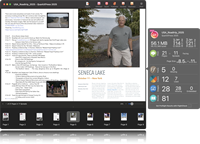
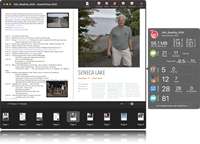
The previews are based on internal document data and are representative of the original document. Text is crisp and zoomable.









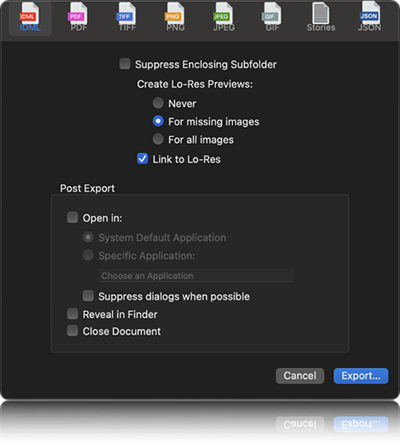
QXPMarkz enables you to export QuarkXPress files to numerous non-proprietary file types, including IDML, PDF, JPEG, PNG, TIFF, GIF, TXT, RTF and HTML. You can also open .QXP files in an earlier version of QuarkXPress or in another application! If you need to export to JSON, check out OmniMarkz!

QXPMarkz is a cutting-edge solution that revolutionizes content extraction and conversion from unstructured formats. It empowers you to effortlessly extract and convert content from QuarkXPress (QXP) and other unstructured formats into structured formats like JSON, XML, and IDML, unlocking the true value of your content.
QXPMarkz allows you to extract QuarkXPress text stories as RTF, HTML, or plain text (TXT), while preserving the original text formatting, making seamless conversion easier than ever.
Unlock new avenues for revenue growth by recycling your content for a competitive advantage. Leverage vector databases and large language models (LLMs) to streamline your workflow, making it more sustainable and efficient.
Further simplify the process, by configuring the Automation Preferences, to automatically export and open the file, in your chosen application. Double click a QXP file, in Finder, and the document will open in InDesign, Affinity Publisher, an older version of QuarkXPress*, or another application of your choice.
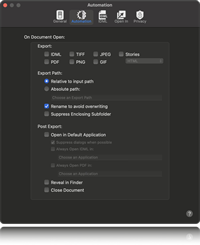

With Automation Preferences, AppleScript support and a Custom URL Scheme, QXPMarkz will have no problem integrating into most automated workflows.

Users who are familiar with our Q2ID InDesign Plug-Ins appreciate the ease of converting QuarkXPress documents, directly, within InDesign. QXPMarkz comes with the same type of integration, allowing users to choose “Open QuarkXPress File…” right from the InDesign File menu. The selected document will be converted by QXPMarkz and opened in InDesign, automating the entire QuarkXPress-to-InDesign file conversion process.
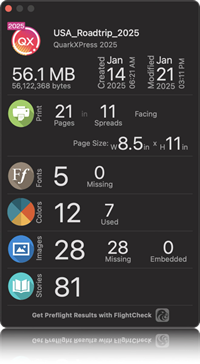
The document inspector view gives a high-level document summary, with file type, version, size, creation date, modification date, page count, spread count, page size, font, color, and image data.
Markzware has long been known for our conversion plug-ins and XTensions, but we’ve outdone ourselves, with a standalone QuarkXPress conversion and preview application. With over three decades of software development experience in the preview and conversion of Desktop Publishing files, Markzware offers a standalone app, to help you more easily process QuarkXPress files in today’s DTP workflows.
- Standalone Conversion: Converts QuarkXPress files to IDML (InDesign Markup Language), allowing you to open them in Adobe InDesign, Affinity Publisher, and other applications.
- Preview Functionality: Provides a fast, crisp, and zoomable preview of QuarkXPress documents without needing the QuarkXPress app.
- File Inspector: Features a high-level Document Inspector that provides an overview of the file, including version, size, creation date, page count, fonts, colors, and image data.
- Export Options: Allows exporting QXP files into multiple formats, including IDML, PDF, TIFF, PNG, JPEG, and GIF.
- Text Extraction: Extracts styled text stories from QuarkXPress documents, allowing you to save them as RTF, HTML, or plain text (TXT).
- Automation: Integrates with workflows via AppleScript, a Custom URL Scheme, and Automation Preferences to automatically open converted files in chosen applications.
- InDesign Integration: Includes scripts that add a "Open QuarkXPress File..." option directly into the Adobe InDesign File menu.
- Support for Libraries: Can convert QuarkXPress (.qxl) libraries.
- No QXP Needed: Allows you to handle, view, and convert QuarkXPress files without owning or installing QuarkXPress.
- Automation: You can configure the application to automatically convert and open files when you double-click them in Finder.
- Batch Conversion: Supports converting multiple files at once.
- Efficiency: Saves time by eliminating the need to manually rebuild complex documents.
- Operating System:
- RAM : 4GB RAM minimum
- Display : 1024x768 display or better
- Internet Connection : Internet connection to activate and register
- Architecture : Intel 64-bit or Apple Silicon
- Storage : 1GB free space
- Model-Specific Support (Minimums) : Mac Pro, iMac, iMac Pro, MacBook, MacBook Pro, MacBook Air, Mac Mini