 Internet
Tools & Utilities
Atomic Email Hunter Description
Atomic Email Hunter

Author Company: AtomPark Software
Atomic Email Hunter is a Software For Email Scraping From Massmail. Extractor For Email Addresses And Names From Websites. ... ...
File Size:
OS:
License: - Time Limit, free to try, to buy.
File Size:
OS:
License: - Time Limit, free to try, to buy.


Atomic Email Hunter
Collect quality contacts and personalize your mailing lists. Create highly targeted contact lists!

Email Hunter – Find And Extract Any Email Address — Massmail Software
Email Hunter is a Software For Email Scraping From Massmail
✔️ Extractor For Email Addresses And Names From Websites
➡️ Try The Best Email Finder For Free With Trial
✔️ Extractor For Email Addresses And Names From Websites
➡️ Try The Best Email Finder For Free With Trial


Atomic Email Hunter is automatic email searcher and extractor from any site on the Internet
- Extraction of contact addresses from your email account using the Mailbox plugin
- Identification of the country of the address owner using email address domain and location of extraction
- Email address search on webpages that require a login and password
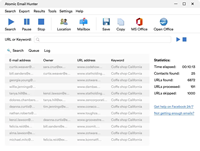
The program searches for the websites that corresponds to the specified keywords and searches for email addresses on selected websites. You can transfer e-mail addresses from our email spider into any other Atomic program by a click. You do not need to save the results into a temporary file risking losing any data.
Atomic Email Hunter is software for collecting email addresses from the Internet. Our email spider extracts email addresses and the names of their owners from websites and search engines.
The spider allows detecting the advanced criteria of hunting – such as filtering by the domain and URL length, by email addresses, priority links and much more.
Domain filter ("Settings/Common settings/URL filters") defines the opportunity to limit the domains for searching in (URL must contain…) or the domains for ignoring (URL must NOT contain…).
Atomic Email Hunter allows to set the criteria for e-mail address filters. The user specifies what filters must and must not contain ("Settings/Common settings/E-mail filters").
Also the spider allows to set the maximum number of email addresses for extracting from a single site, to specify the max length of a link or to determine the priority pages ("Settings/Common settings/Advanced").
We have created an option to enter a list of websites or keywords ("Search/Search in list"). So you do not have to wait for one process to finish before starting another. Define the list of URLs or keywords and leave the email spider running. When you come back you will see a long list of new email addresses.
You are able to specify the website to search on ("Search/Search on site"). Enter the URL of the website you are interested in. Atomic Email Hunter will extract all the emails from its pages.
Support's Yelp, Facebook, Twitter and Mailbox plugins.
Mailbox plugin is very suitable for extracting contact addresses from the user's current email account. So, if you use this plugin, Atomic Email Hunter will scan all the email messages in the mailbox and extract all the available addresses. It's up to the user if set the hunting limitations: search only in headers or additionally scan email content.
Mailbox plugin is very suitable for extracting contact addresses from the user's current email account. So, if you use this plugin, Atomic Email Hunter will scan all the email messages in the mailbox and extract all the available addresses. It's up to the user if set the hunting limitations: search only in headers or additionally scan email content.
Mailbox plugin for Atomic Email Hunter supports both POP and IMAP connection types, and also SSL connection if required.
The trial version of Mailbox plugin is available for use right after the software installation. The only limitation of the trial version is determined by the incapability to save the extracted results.
Atomic Email Hunter uses Internet Explorer settings by default ("Settings/Common settings/Proxy settings") and chooses the best proxy server from those you use for site session automatically.
It is better to specify the proxy server manually ("Settings/Common settings/Proxy settings") as it is the way to define the kind of proxy servers the email spider will use. You just need to enter the proxy address and port number, your login and password.
Use proxy server if website blocks your IP-address for over limited access attempts. Besides, proxy servers can keep your IP-address hidden, so your site visits stay anonymous.
You have an opportunity to manage the hunting limitation. This means you can choose between "All links/Current site only/Current and sub-folders/Current page only" and define the search area for Atomic Email Hunter. The spider will hunt for email addresses, for example, on the current site only, ignoring all the other links.
Atomic Email Hunter runs in multithreaded mode: opens many pages at once using the advantages of a broadband Internet connection ("Settings/Common settings/Connection").
The user can choose the type of search for process optimization. There are two search types allowed:
- "Fast search" – works faster but extracts less emails.
- "Detailed search" – works slower but extracts more emails.
After stopping email search Atomic Email Hunter represents the expanded contact list with the keyword email address was found by.
When our email spider finishes its work, it's time to pass over the results to other software for email cleaning and sanitation. You can easily import the results into:
- Atomic Mail Sender
- Atomic Verifier
- Microsoft Excel
- Microsoft Word
Atomic Email Hunter has more features as:
- Timeout between queries
- Save the results
- Expanded Log
- Confidentiality
- Skip domain
- Search for emails on site by keywords
- Extracting email owner names
- Operating System :
- Version : The latest versions are typically updated, with recent iterations supporting modern Windows environments
- Licensing : Trial version available; 7-day free trial allows testing, but registration is required to save extracted data
- System Resources : No specific high-end requirements are listed, suggesting compatibility with standard desktop configurations
- Functionality :
- Search Engine Integration : Uses keywords to find relevant websites and extract emails
- Mailbox Plugin : Extracts contacts from local email accounts
- Filtering : Filters results by domain, location, and other criteria
- Proxy Support : Configurable proxy server settings
- Installation/Activation : The program is installed on a single computer and can be deactivated to transfer to a new machine
More Products from company AtomPark Software :
Check for all products list from AtomPark Software ...
Check for all products list from AtomPark Software ...