 Internet
Email
Atomic Mail Verifier Description
Atomic Mail Verifier

Author Company: AtomPark Software
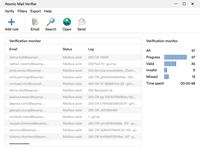
Atomic Mail Verifier is A program to verify e-mail addresses in mailing lists. Atomic Email Verifier Is A Professional And Easy-to-use Bulk Email Checker. ... ...
File Size:
OS:
License: - Time Limit, free to try, to buy.
File Size:
OS:
License: - Time Limit, free to try, to buy.


Atomic Mail Verifier
Remove nonexistent email addresses to increase email servers’ confidence to your messages

Email Verifier Software — Bulk Email Address Verification Tool — Massmail Software
Atomic Email Verifier Is A Professional And Easy-to-use Bulk Email Checker
✔️ Remove Dead Or Invalid Mails From Your Mailing List
➡️ Get Bulk Email Addresses Checking Tool At The Best Price
✔️ Remove Dead Or Invalid Mails From Your Mailing List
➡️ Get Bulk Email Addresses Checking Tool At The Best Price


Atomic Mail Verifier is program that checks email addresses against standard spelling rules
- Connect to the SMTP server and check the email address existence on it
- Domain is verified; in the case of an incorrect domain, the email address will not exist
- Fast and easy mailing lists import from local files of different formats
Our email checker software performs validation step by step. The program is designed to import an email, check it's syntax first, then its domain name and afterwards send a query to the corresponding email server.
Atomic Mail Verifier is an email checker and email cleaner in one program. Unlike other similar software, our email verification tool uses four levels of verification to ensure that you will never lose any valid electronic address.
How email validations work:
- Syntax check: email addresses are checked for correspondence to the RFC registration.
- Domain check: all domains are checked for existence. If a domain does not exist, the electronic address with that domain also does not exist.
- Email address check: the program searches for a domain's SMTP server, and checks for user existence. This step is only possible if you have port 25 open.
- Catch all status check: regrading a catch-all status, on the fourth step of verification the software generates a random email with the same domain. If a server responds that a generated email is valid, a defined email you aimed to validate will be marked as "email domain has a catch all function enabled". For instance, we validated baljit59@yahoo.com, in the log you can see the app generated a random address with the same domain, b8a0l5j9i1t55198@yahoo.com in this case (so it should not exist), but the server replied that it exists, thus we can not state that baljit59@yahoo.com exists for sure. Mostly the rule for such status is that this server accepts all emails sent to it even if the email on the server is non existent and overall we recommend to avoid such emails in your campaigns unless absolutely necessary, because there is not way to validate those.
With this effective four-step verification, Atomic Mail Verifier allows you to weed out the maximum number of nonexistent addresses, as well as prevent the removal of those that are truly valid.
In this way, you can specify optimal operation depending on your mailing list size and computer features.
You can verify email addresses in two ways: standard and advanced. Select the type you need in "Common Settings/SMTP/Type of validation".
- Standard validation uses the standard algorithm for email address verification.
- Advanced validation is an effective algorithm for multiple domains. In the filter settings, specify those domains you want to check with this algorithm. This means that you need to insert a list of domains to which you want to apply advanced validation.
The usage of advanced validation significantly improves the quality of email address verification. But in any case, there can be no 100% correct email verification because the software relies on responses of the receiving SMTP servers and they sometimes block verification attempts or give incorrect replies.
You can set the rules you need for any existing domains. Just select a domain and specify a rule for it.
What is a rule? In practice, it is a kind of default status for the selected domains.
Available rules include:
- Always "Correct"
- Always "Incorrect"
- Always "Missed"
Expanded email address statuses supply more accurate verification results. It is not just about finding out if the email address exists or does not exist, but displaying its real condition.
Atomic Mail Verifier, for example, indicates the connection error or nonexistence of an email address on an existing domain.
This allows users to know the exact condition of each and every email address on their mailing list, and also offers the opportunity to save email addresses with the necessary status only, or to check nonexistent addresses one more time.
Atomic Mail Verifier allows you to load mailing lists from your clipboard, from *.doc, *.docx, *.txt, *.xls, and *.xlsx files, or from Outlook Address Book.
Full integration with other Atomic programs allows you to run Atomic Lead Extractor, Atomic Newsgroup Explorer, and Atomic WHOIS Explorer simltaneously, and directly import the list of extracted addresses to Atomic Mail Verifier.
You can save verified email addresses to MS Office (Word, Excel), Open Office (Writer, Calc), a text file, or to your clipboard. The newly generated document will contain existing email addresses only.
To export all kinds of email addresses (correct, incorrect, and unchecked) to a different file format, use Export Wizard. A new document containing column names and statuses (if required) will be created.
Atomic Mail Verifier supports the transfer of quickly verified email addresses to Atomic Mail Sender and Atomic List Manager services without storing data in intermediate files.
Atomic Mail Verifier allows full use of your list of extracted and managed email addresses with the help of other Atomic products. The program detects the file format automatically on its opening. Atomic Mail Verifier also supports the transfer of quickly verified email addresses to Atomic Mail Sender without storing data in intermediate files.
- Operating System:
- PC Type: Supports both 32-bit and 64-bit architectures
- Installation Rights : Administrator rights are required to install and run the program
- Network : An active internet connection is necessary for SMTP verification
More Products from company AtomPark Software :
Check for all products list from AtomPark Software ...
Check for all products list from AtomPark Software ...