47X Faster Speed. High Quality. All for 4K
Winxvideo AI is a full GPU-accelerated video converter designed for swifty 4K/8K video conversion with top-notch quality and minimized file size.
Smooth 4K/8K Conversion
The GPU acceleration technology makes the stuttering high-res video conversion butter smooth. Your 4K, 5K, and 8K videos now are compatible and lightweight for playing and sharing.
Full GPU Acceleration
Leveraging IntelŽ, AMDŽ, NVIDIAŽ, and Apple Silicon GPU acceleration, along with Multi-core CPU & Hyper-Threading, it achieves speeds up to 47x real-time faster and consumes less CPU.
Preserve Highest Quality
First-class video converter won't sacrifice quality. Armed with Auto Copy and High-Quality Engine, Winxvideo AI guarantees crystal-clear image output and preserves 98% or higher quality.
Convert any Video/Audio, Tailored for Every Platform
Winxvideo AI supports an extensive 370+ inputs and 420+ outputs, ranging from general video, audio, 3D, to 4K footages. Whether selectively converting or batch-processing your media files, enjoy control at your fingertips.
Convert video
Built in 320+ video codecs & formats, Winxvideo AI supports an extensive array of file formats, from popular choices like MP4, MOV, MKV, WebM, and AVI to advanced options such as HEVC, VP9, ProRes, XAVC, and 360° videos.
As a 4K video converter, it is a piece of cake for Winxvideo AI to digest video sources like iPhone 4K@60fps, GoPro HEVC @60fps, DJI 4K@120fps, Sony 4K 10-bit, or Nikon 8K@30fps. Tailor your videos for optimal performance on PC, mobile, social platform, and beyond.
- 4K, 8K, 3D support
- Auto copy
- Batch conversion
- Adjust resolution, FPS, bitrate
Convert audio
Winxvideo AI is the hub for audio conversion, supporting an impressive array of 50 audio formats. From the ubiquitous MP3 to the nuanced tones of AMR, WAV, OGG, FLAC, AAC, AC3, M4A, M4R, AIFF, and MP2, Winxvideo AI covers all your audio conversion needs.
It not only allows audio-to-audio conversion but also excels at extracting audio from video and making lossless audio copy. This gives you freedom to craft personalized ringtones, enjoy music on the go, seamlessly integrate soundtracks into your editing projects, etc.
- 50+ audio formats
- 320kbps high quality
- Video to audio
- DTS surround sound
Convert folder
With a robust batch conversion feature, Winxvideo AI effortlessly converts video files in batch. By harnessing the power of GPU acceleration, it ensures an efficient transformation within minutes, saving your valuable time and effort.
This software goes beyond the ordinary, offering a plethora of conversion possibilities. Whether you are going to convert 3D to 2D, transform video into GIF, extract high-quality JPG or PNG, or pass through video streams to MKV, Winxvideo AI has your needs covered.
- Batch conversion
- Make GIF
From Camera Footages to Downloads and DVD Rips, Any Video Can Be Useful
Elinimate Video Playback Error Once and for All
Winxvideo AI effortlessly handles videos from iPhone, GoPro, DJI, Cannon, and other camera brands. It adeptly converts formats like MKV/MOV/MP4, processes DVD/blu-ray rips, transcodes H.265/AV1, downscales 4K/8k, etc., all facilitating seamless playback across multiple platforms.
- 4K to 1080p
- H.265 to H.264
- 60FPS to 30FPS
- No A/V out of sync
- No choppy playback
- Remove black screen
- No dropping frames
- Play on any device & platform
Convert and Ready Your Recordings for Seamless Editing
Don't worry about missing codec or not importing error while editing, Winxvideo AI converts your file like 4K and VR to be friendlier and redefines regular footage into something more acceptable such as ProRes. Now Premiere Pro, Davinci Resolve, and iMovie recognize your videos perfectly.
- Upscale/downscale 4K
- Convert HEVC to H.264
- No missing codec
- No importing error
- No black screen
- No A/V sync error
- No laggy/sluggish while editing
- No PC crashes
Upload, Share & Get Likes without any Limits
Social platforms come with diverse requirements, from file size constraint, length limitation, specific dimension mandate, limited support for HEVC, to quality reduction. Winxvideo AI helps convert and compress video tailored for any platform, be it social media, cloud storage, or other hosting sites.
- Convert HEVC
- Compress 4K/HD video
- Crop video in 16:9, 9:16, 1:1, etc
- Cut & shorten video
- No uploading stuck
- Share video fast
- No quality degradation
- No black bars
Enhance Video to Cinema-grade Quality with Winxvideo AI
Winxvideo AI is an intelligent video quality enhancer that leverages cutting-ledge deep learning techs for unparalleled super resolution, video stabilization, and frame interpolation. Upscale your old and low-quality video to crystal-clear 4K, stabilize shaky footage, and boost fps to up to 60/120/240fps, all for an ultra-clear, smooth, and steady visual journey.
- Upscale Video to 4K
Up to 400% AI upscaling. Enhance old footage, low-quality video, low-resolution anime, AI-generated images, etc. to 4K with more details.
- Stabilize Shaky Footage
Stabilize handheld footage, remove camera shake, zooming jitters, wind-induced shake, or any other tremors without excessive cropping.
- Boost Video to 60FPS
Boost your video FPS to 60/120fps and beyond, and make your stuttering video ultra-smooth.
- Denoise Video
Enhance the clarity of the video by reducing the noise caused by factors such as low light conditions, high ISO settings, and camera sensor limitations.
Full-featured. Unleash the Power of Your Media Files
More Tools. More Possibilities.
Video Compressor
With an advanced compression kernel & higher coding-efficient codecs, Winxvideo AI reduces file size by up to 90%.
Video Recorder
Record high-quality video from screen or Webcam. Capture gameplay highlights, online courses, streaming videos, etc.
Video Editor
Trim, crop, split, rotate, and flip video. Add subtitles, effects, and watermarks to video, change playback speed, etc.
Video Merger
You can stitch multiple clips into one movie. Merge videos from GoPro, DJI, Sony, etc.
GIF Maker
Create funny or interesting animated GIFs from movies, music videos, TV shows, etc.
Subtitle Editor
Download subtitles, add external .srt, .ass, .ssa, and extract subtitles from videos.
Your Video. Your Way.
Winxvideo AI addresses video conversion needs for every user, whether you are a Vlogger, YouTuber, or music lover.
- Empower Your Vlogging Journey
Winxvideo AI caters to vloggers by seamlessly converting and optimizing videos for various social platforms, be it YouTube, Facebook, Tiktok, Instagram, or Twitter. With it, you can focus on creating engaging contents without worrying about format, file size, or other limitations.
- Convert and Share Your Masterpieces with Ease
For photographing enthusiasts, Winxvideo AI makes sure that the recordings captured by cameras like GoPro, DSLR, Mirrorless, DJI, iPhone, and more are easily converted and compressed, so that the visual masterpieces are not only playable but also sharable across any device.
- Elevate Your Music Experience
Winxvideo AI offers a seamless transition for music lovers by converting audio formats. It ensures good compatibility across various devices. Whether you are sharing captivating audios or curating playlists, it maintains the integrity of sound and enhances the overall listening experience.
- Versatile Media Transformation for Seamless Educational Delivery
When producing educational videos, whether for online lectures or interactive content, it's often necessary to change the media files to different formats to suit various teaching platforms. Winxvideo AI is a helpful tool for converting all your files into different formats and sizes, thus enhancing the accessibility of educational materials.
- Share Marketing Content Across Platforms
If you have corporate videos and presentations right in hand, it may be necessary to convert them to adapt them to various media channels like social media, email. Winxvideo AI streamlines the converting process, making it easier to share promotional content, training materials, and other video resources effectively.
Guide: How to Convert Videos with Winxvideo AI
In a few clicks, you can use Winxvideo AI to convert between any format for any device and platform.
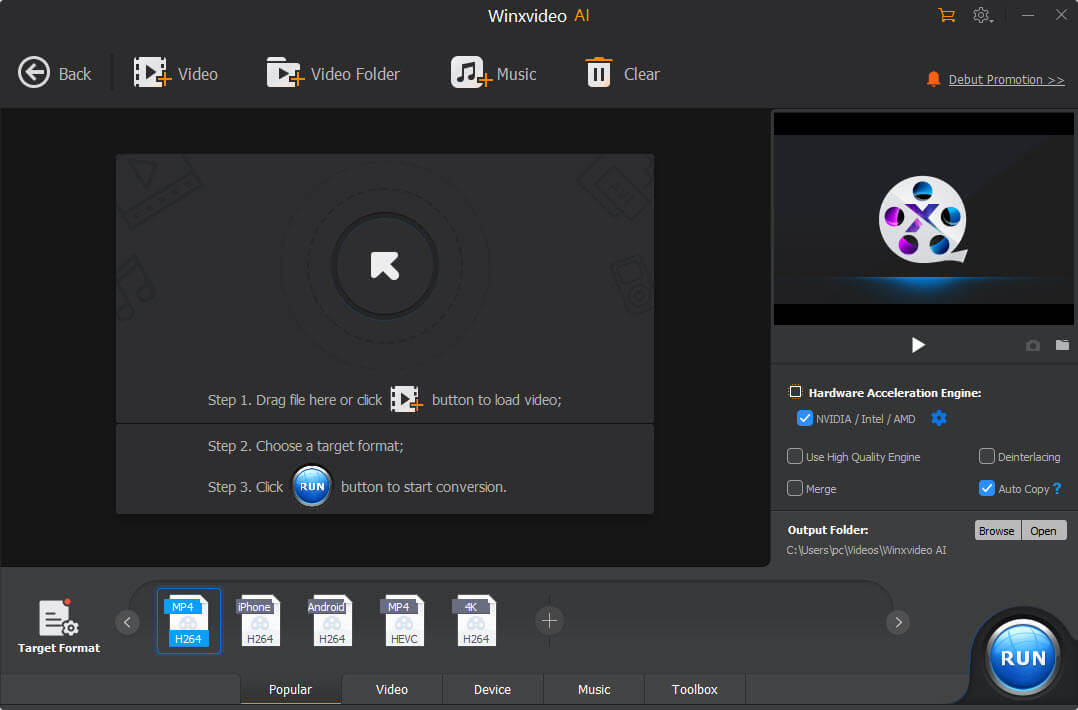
Step 1. Add Video(s)
Click on the "Video Converter" button on the main UI, and click on "+ Video" to add the video file(s) to the program you want to convert.
Step 2. Choose Target Format
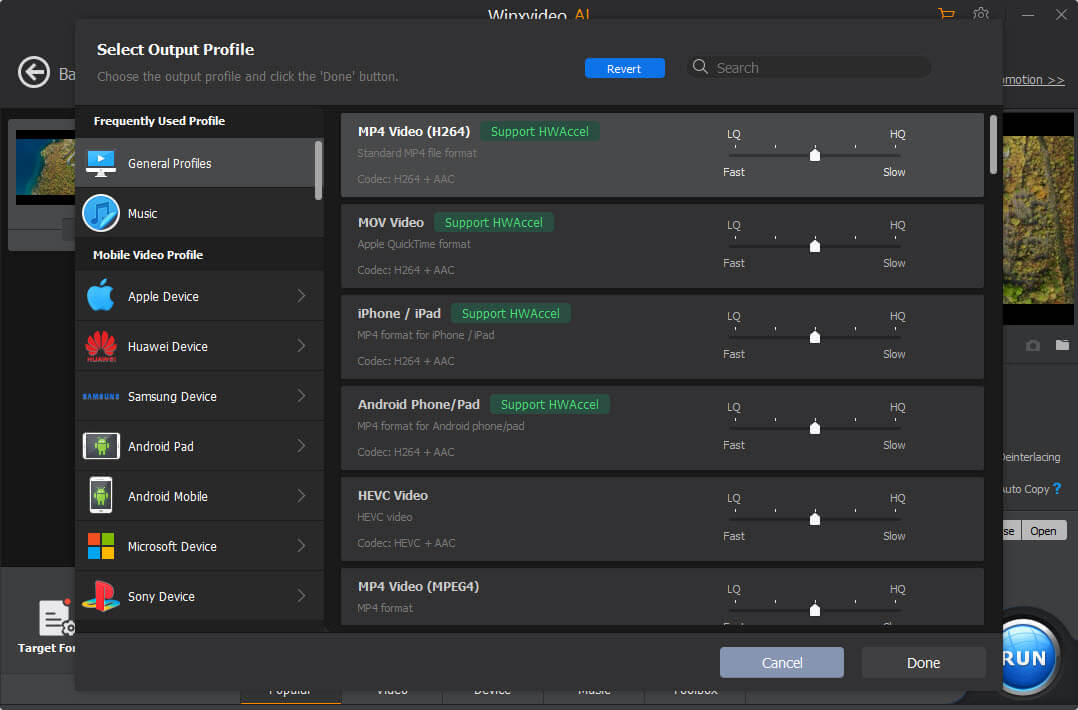
Once added, choose a desired format by clicking on "Target Format" at the bottom.
Step 3. Edit and Adjust Parameters
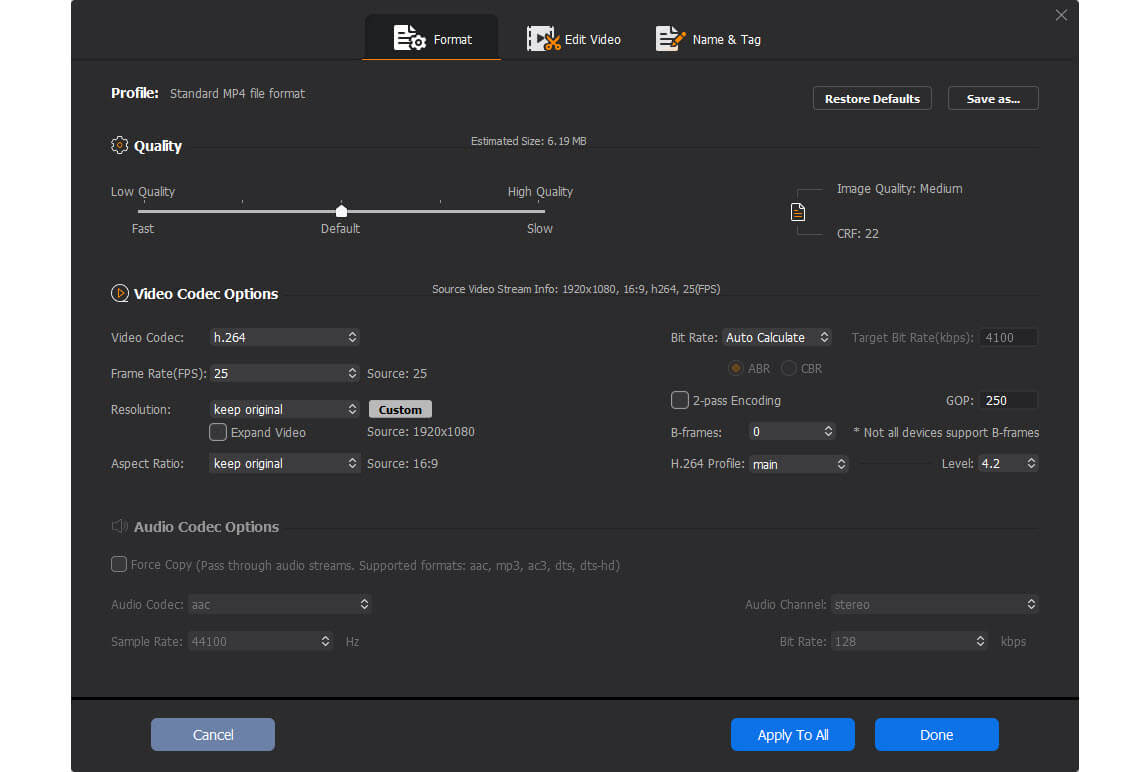
Optionally, you can click on the "Codec Option" icon to edit videos (effect, watermark, cut, crop, subtitle, etc.) and adjust parameters (resolution, bitrate, fps, etc.).
Step 4. Start Converting
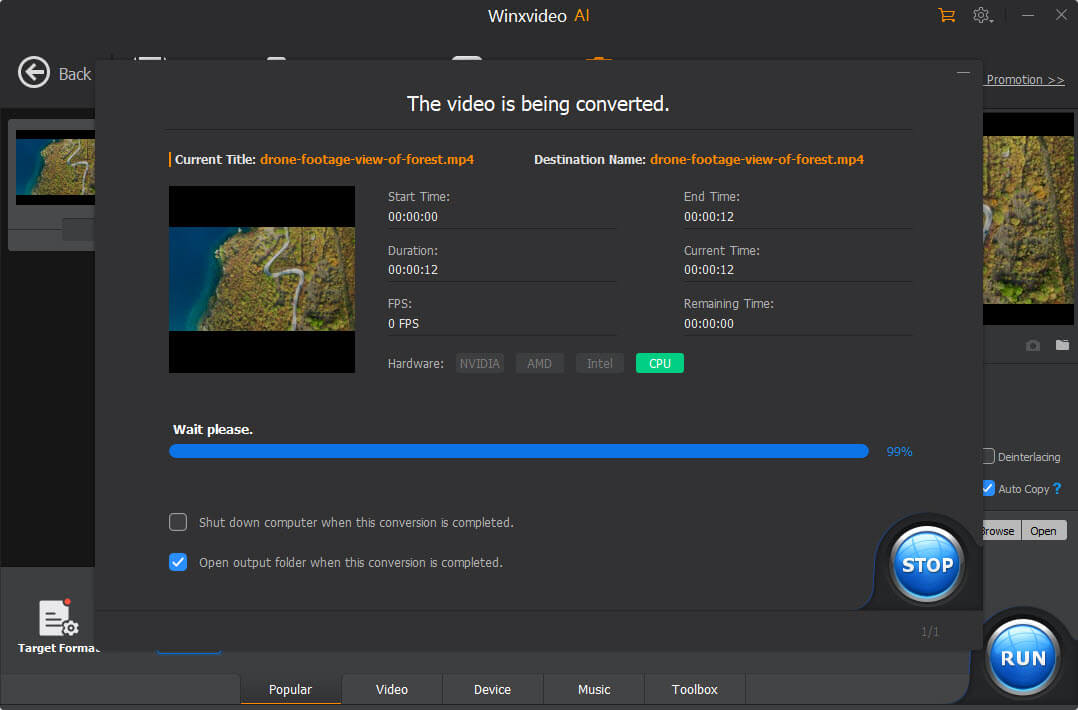
When everything is OK, click on the "RUN" button to start converting. You can also specify the destination folder before doing so.
Frequently Asked Questions
How to change video format?
To change video format, you need a video format converter like Winxvideo AI to convert between video formats, such as MOV to MP4, MKV to MP4, H.265 to H.264, etc.
How do I convert video to MP4 for free?
For a variety of reasons, including the best compatibility with players and devices, MP4 is the most preferred format. Additionally, MP4 has a higher degree of compression with the same image quality as M2TS, MKV, AVI, etc. Thus, it is highly advised to convert videos to MP4 H.264 format. Winxvideo AI, the GPU-accelerated 4K video converter can convert any video to MP4 format. The conversion process is quite easy: Simply install and launch Winxvideo AI > add a video to it > choose MP4 as the output format > start converting to MP4.
What's the best video converter?
There are a plethora of options available for transcoding videos, including software, extensions, and apps. Which video converter is the best option available? To be honest, there are no hard and fast rules. All you have to do is select the option that best fits your needs. But there are a few things to think about when choose the best video converter, including wide support for formats, fast conversion speed, high output quality, and ease-of-use.
How can I convert video without losing quality?
Transcoding, the process of converting video from one format to another, typically entails lossy compression and results in a loss of quality. It is difficult for standard video converters to convert files without re-encoding in order to maintain quality. But with Winxvideo AI, you can convert a video file while maintaining its underlying codec, resolution, bitrate, frame rate, and other components by using the Auto Copy feature. Therefore, there won't be any reduction in quality.
 GPU Accelerated