 Copy DVDs with Original Quality
- Copy DVDs to DVD ISO image, Video_TS folder, MPG, MP4, etc. for burning.
- Make copy of DVDs with region codes, CSS, UOPs, Disney DRM, Sony ARccOS, etc.
- Copy DVDs on Windows 11/10/Mac with original data in 5 minutes.
- 47X real-time faster | 1:1 quality ratio | 80% smaller
How to Copy a DVD to DVD with Original Quality
Having a Plan B is always better than nothing since your precious DVD collections can get damaged, scratched or lost easily. Maybe you've tried different ways to copy a DVD, such as copy a DVD to your computer, rip DVD to a digital file for storing on hard drive, copy a DVD to another blank DVD disc... However, there are always some common failures:
- DVD movies cannot be copied successfully because of strict copy-protections.
- Data Error (Cyclic Redundancy Check) message pops up as the target disc is dirty or scratched.
If you copy a DVD to another blank DVD, you may find that the duplicated disc cannot be played well on a home DVD player. So how to copy a protected DVD flawlessly? How to make a duplicate DVD copy that plays successfully on any player? In this post, I will introduce you the most powerful way to copy a DVD to DVD in 1:1 quality on Windows 11/10/8/7 etc. with a solid DVD to DVD copy program.
Way 1: Copy DVD to DVD with WinX DVD Copy Pro
Free Download the Best DVD to DVD Copy Software
In order to make a duplicate DVD copy that can be played on any player, an authority software that supports all disc media types is needed. WinX DVD Copy Pro is worth a try.
- It will copy a DVD to another DVD with all original data, incl. videos, audio tracks, menus, subtitles and languages.
- Unlike other free DVD copy software that can only copy unprotected DVDs, it can copy all protected DVDs, incl. new DVD movies, and DVDs protected by CSS, region code, UOPs, AACS 2.0, FBI warnings, bad sectors, Disney DRM, Sony ARccOS, etc.
- It supports other types of discs, be it damaged/unplayable disc, workout DVD, AV DVD...
- It will copy DVD to DVD, DVD to VIDEO_TS folder, ISO image or back up titles/chapters to a single MPEG2 file, extract audios from DVD, burn ISO/VIDEO_TS folder to DVD, and mount ISO file as a virtual drive. Now free download it and have a go today!
- It will copy a DVD to a DVD with a single drive or multiple drives.
Steps to Copy a DVD to another DVD in 1:1 Quality
Download and install this DVD to DVD copier on your PC (compatible with Windows 11/10/8/7/XP and older OS). Follow the guide to copy a DVD to another blank DVD disc on Windows.
- Prepare a blank DVD±R disc. Make sure that the total size of the original DVD data you want to burn onto the DVD does not exceed the DVD's capacity. A single-layer DVD has a capacity of 4.7 GB, which is enough for up to 2 hours of video. A double-layer DVD has a capacity of 17 GB.
- WinX DVD Copy Pro supports blank writable DVD disc in types: DVD-/+R (DL), DVD-+RW (DL) and DVD RAM.
- If you only have one disc drive, don't worry. This method allows you to copy a DVD to another DVD with one drive or multiple drives.
Step 1. Insert the disc you want to backup into DVD drive. Launch WinX DVD Copy Pro and select the Clone DVD to DVD option under Full Disc Backup on left function area.
Step 2. Pick up your Source DVD and Target DVD Burner (blank DVD disc) under selective options by clicking the arrow-down icon. If you only have one DVD drive, just leave the Target DVD Burner as default.
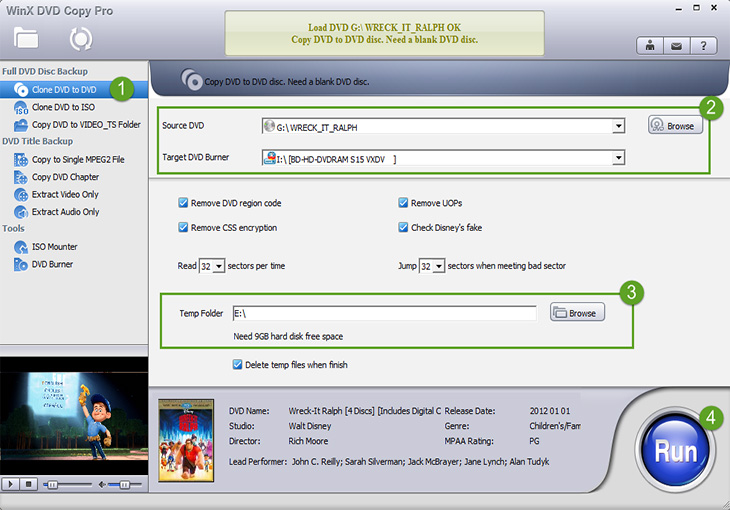
Step 3. Hit the Browse button near the Temp Folder and choose a destination route for saving the cloned ISO file temporarily.
Optinal: To copy a protected DVD to another DVD, you'd better check all the copy protection boxes. You can also copy a damaged/scratched DVD to a DVD by telling the program which sector to skip.

Step 4. Click the RUN button at the bottom right corner. This is the last shoot of copying a DVD to a blank disc on Windows 11/10/8/7/earlier.
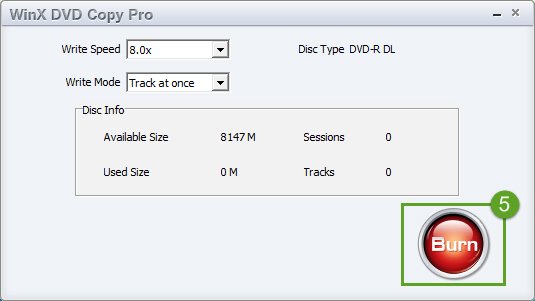
Step 5. Adjust the writing speed and mode for the DVD to DVD copying. Here are two situations:
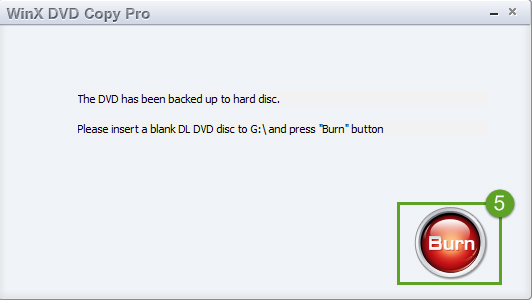
• If you only have one optical drive, the source DVD will be copied as an ISO file and saved in the temporary folder. When the copy process is completed, it will require you to insert a blank DVD disc for copying the DVD ISO image. Eject the original DVD and insert the blank DVD into the optical drive. Then click adjust the DVD to DVD writing speed and mode and click Burn to start.
• If you have multiple drives, things get easier. Simply insert the source DVD and the blank DVD disc together. Both two DVDs will be automatically detected. You need to adjust the DVD to DVD writing speed and mode, and then hit the Burn button and wait.
Disclaimer: Digiarty Software does not advocate copying encrypted DVDs for any commercial purpose, you are suggested to refer to the DVD copyright laws in your countries first.
Way 2: Copy DVD to DVD or Computer with WinX DVD Ripper Platinum
WinX DVD Ripper Platinum is a DVD ripping software enables you to copy DVDs to ISO image/TS folder/MP4, AVI, WMV, video formats for later burning. It supports a wide range of DVD discs, including protected DVDs, homemade DVDs, damaged/scratched DVDs, 99-title DVDs, workout DVDs, TV series on DVDs, to name a few. Original quality and content can be reserved.
Step 1: Make a Copy of DVDs on Windows 11/10/Mac
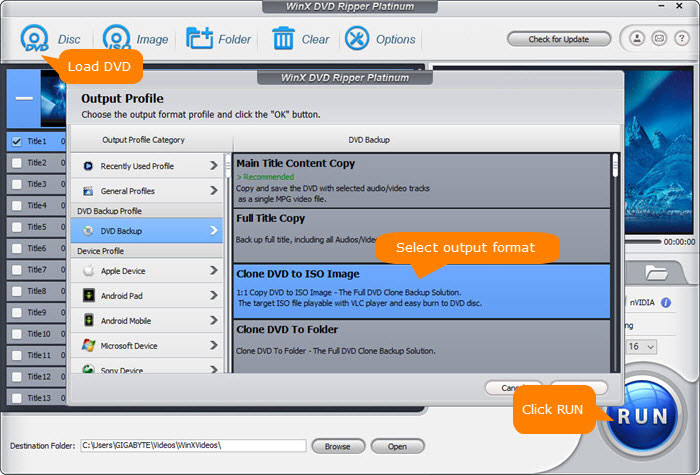
Free download WinX DVD Ripper Platinum and run it on your computer. Insert the source DVD to your DVD drive. Click the "DVD" icon at the top menu bar and select the source DVD to load. The DVD will be loaded quickly and an Output Profile window pops up.
On the Output Profile window, choose DVD Backup Profile > DVD Backup Profile > DVD Backup > Clone DVD to ISO Image, Video_TS folder, or MPG. Click the Browse button to pick a location and click OK to save the settings. Click the RUN button at the bottom to start copying DVDs to your computer.
Optional: If you simply want to copy a DVD to your computer, you can choose another video format like MP4, MOV, AVI, or another based on your need. The DVD will be copied onto your computer in the format you select. You can skip Step 2, which involves copying the DVD video to another DVD.
Step 2: Copy DVD ISO Image/Folder to Another DVD
Copy DVDs on Windows 11/10/8/7:
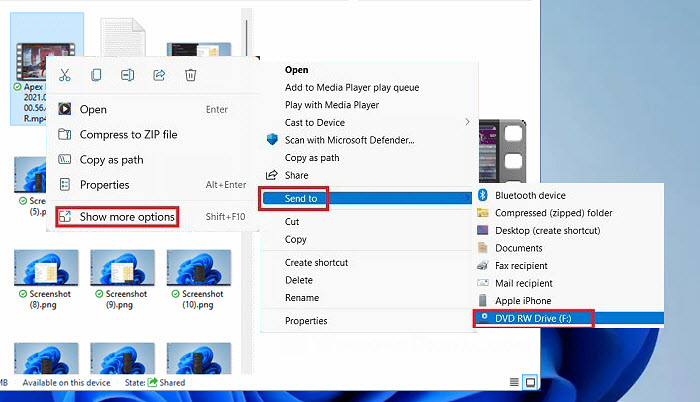
Insert a black DVD onto the DVD drive on Windows. An Autoplay window will appear. Select the DVD ISO image you want to copy to a DVD and right-click on it, choose Send to > DVD drive. From the Burn a Disc window, choose "With a CD/DVD player", and click "Next". Drag and Drop the copied DVD ISO image files into the black DVD window for burning to the blank disc. Then click on the Finish burning option.
Copy DVDs on macOS:
Your Mac should have built-in optical drive, or is connected to an external DVD drive. Insert a blank disc to your optical drive, choose Open Finder, and the disc will appear on your computer desktop. Double-click the disc, drag the ripped ISO image files to the window. Arrange and rename the files as you wish, otherwise you can't rename the file name after burning. After you've all set, choose File > Burn disc, and follow the popping up instructions to finish the DVD copy process on macOS.
FAQs about Copying DVDs to DVDs
1. How to copy a DVD to another DVD using Windows Media Player?
Windows Media Player can't copy DVD to DVD directly. You can copy the movie files from your DVD on your computer and then burn the movie files to DVD using Windows Media Player.
To copy movies from home-made DVD to computer, you may follow the steps below:
- Insert the DVD into the CD\DVD drive.
- Open computer, click on DVD drive, and select the files you want to copy.
- Copy and paste selected files to the location where you want to save those files.
To copy movies from commercial DVD to computer, follow this:
- Open WinX DVD Ripper and click DVD disc button to load your DVD.
- Choose output format.
- Click RUN to begin copying DVD to computer.
Now, follow the steps below to burn DVD on Windows 11/10/7 using Windows Media Player:
- Open Windows Media Player, click Burn, select Burn Options, and choose Data CD or DVD.
- Insert a blank DVD and select it.
- Find the movie you copy from DVD and drag and drop it to the Burn list of Windows Media Player.
- Click Start burn to begin burning DVD.
2. Can HandBrake copy DVD to DVD?
No. HandBrake can't copy DVD to DVD. It can only convert DVD to MP4, MKV, and WebM.
3. Can Walgreens copy DVDs to DVDs?
Yes.
4. How to copy protected DVD to DVD?
WinX DVD Copy Pro can help you copy encrypted DVD to DVD. Just follow the guide above steps to perform this.
5. Can you make a copy of DVD you own?
It depends on the laws in your country. In some countries, it may be legal to make a backup copy of a DVD that you own for personal use. In other countries, it may be illegal to make any copies of DVDs, regardless of whether you own them or not. Additionally, some DVDs may be protected by Digital Rights Management (DRM) technology, which makes it difficult or impossible to make copies. In practice, it's safe to copy DVD to DVD as it's carried out on your local Windows/Mac machines.
6. Does Walmart make DVD copies?
Yes, Walmart offers DVD and Blu-ray duplication services at some of its stores and online through its website. However, the availability of this service may vary depending on your location and the specific Walmart store you visit.